
Toyota Venza: The distance display and buzzer
When a sensor detects an obstacle, the direction of and the approximate distance to the obstacle are displayed and the buzzer sounds.
- Corner sensor operation and distance to an obstacle
The system operates when the vehicle approaches within the following distances to an obstacle. The indicator flashes and the buzzer sounds when the system is operating.
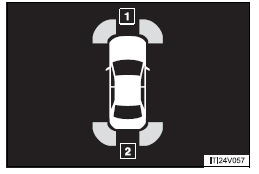
1. Front
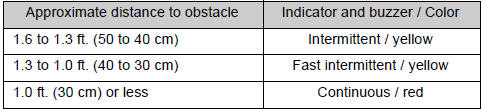
2. Rear
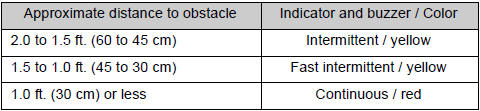
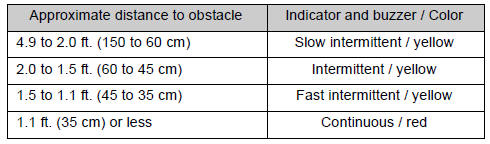
- Back sensor operation and distance to an obstacle
The system operates when the vehicle approaches within the following distances to an obstacle. The indicator flashes and the buzzer sounds when the system is operating.
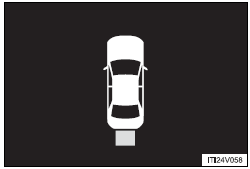
 Display
When the sensors detect an obstacle, a graphic is shown on the multi information
display depending on the position and distance to the obstacle.
1. Front corner sensor operation
2. Rear corner s ...
 Detection range of the sensors
1. Approximately 1.6 ft. (50 cm)
2. Approximately 4.9 ft. (150 cm)
3. Approximately 2.0 ft. (60 cm)
The diagram shows the detection range of the sensors. Note that the sensors cannot
detect obs ...
Other materials about Toyota Venza:
Short in Torque Converter Clutch Solenoid Circuit (Shift Solenoid Valve SL)
(P2769,P2770)
DESCRIPTION
Shift solenoid valve SL is turned on and off by signals from the TCM to control
the hydraulic pressure acting on the lock-up relay valve, which then controls operation
of the lock-up clutch.
DTC No.
DTC Detection Conditi ...
Reassembly
REASSEMBLY
PROCEDURE
1. INSTALL TRANSFER DRIVEN PINION REAR BEARING
(a) Using SST and a press, press the transfer driven pinion rear bearing
(outer race) to the case.
SST: 09950-60010
09951-00620
SST: 09950-70010
09951-07150
NO ...
Throttle Actuator Control System - Stuck Open (P2111,P2112)
DESCRIPTION
The throttle actuator is operated by the ECM, and opens and closes the throttle
valve using gears. The opening angle of the throttle valve is detected by the throttle
position sensor, which is mounted on the throttle body. The throttle positio ...

0.1362