
Toyota Venza: Removal
REMOVAL
PROCEDURE
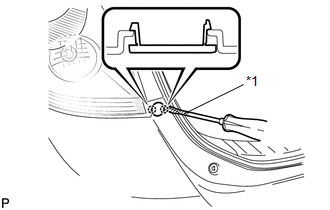
1. REMOVE REAR BUMPER PLATE LH
|
(a) Using a screwdriver with the tip wrapped with protective tape, disengage the 2 claws and remove the rear bumper plate LH. Text in Illustration
|
|
2. REMOVE REAR BUMPER PLATE RH
HINT:
Use the same procedure for the RH side and LH side.
3. REMOVE REAR BUMPER ASSEMBLY
|
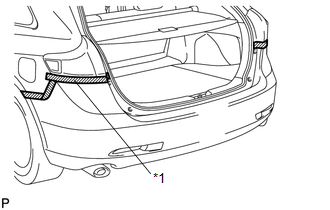
(a) Put protective tape around the rear bumper assembly. Text in Illustration
|
|
|
(b) Remove the 2 bolts and 2 screws. |
|
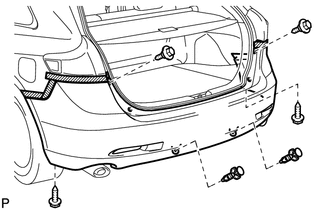
(c) Using a clip remover, remove the 2 clips.
|
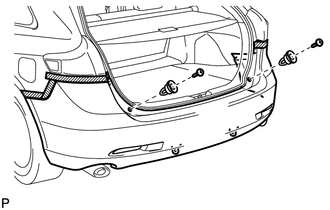
(d) Remove the 2 screws and 2 clips. |
|
|
(e) Remove the screw. HINT: Use the same procedure for the RH side and LH side. |
|
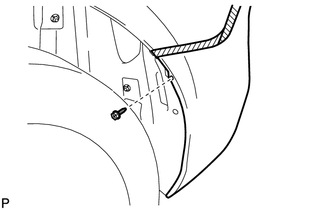
|
(f) Disengage the 5 claws. HINT: Use the same procedure for the RH side and LH side. |
|
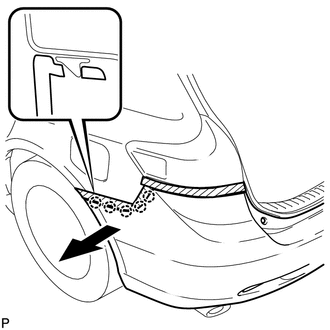
|
(g) Disengage the 6 claws as shown in the illustration. |
|
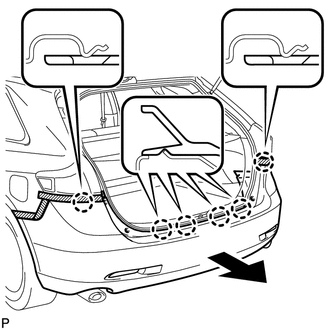
(h) w/ Intuitive Parking Assist System:
(1) Disconnect each connector.
(i) Remove the rear bumper assembly.
 Components
COMPONENTS
ILLUSTRATION
ILLUSTRATION
ILLUSTRATION
ILLUSTRATION
...
 Disassembly
DISASSEMBLY
PROCEDURE
1. REMOVE ULTRASONIC SENSOR CLIP (w/ Intuitive Parking Assist System)
2. REMOVE NO. 1 ULTRASONIC SENSOR (w/ Intuitive Parking Assist System)
3. REMOVE NO. 1 ULTRASONIC ...
Other materials about Toyota Venza:
Key Reminder Buzzer does not Sound
DESCRIPTION
The key reminder warning buzzer sounds when the driver side door is opened while
the ignition switch is in LOCK or ACC. The key reminder warning buzzer is activated
when the main body ECU (driver side junction block assembly) sends an unlock w ...
Types of child restraints
Child restraint systems are classified into the following 3 types according to
the age and size of the child.
► Rear facing -- Infant seat/convertible
seat
► Forward facing -- Convertible seat
► Booster seat
- When install ...
Removal
REMOVAL
CAUTION / NOTICE / HINT
HINT:
When installing new name plates and emblem, heat the vehicle body, name plates
and emblem using a heat light.
Heating Temperature
Item
Temperature
Vehicle Body
40 to ...

0.1381