
Toyota Venza: Removal
REMOVAL
CAUTION / NOTICE / HINT
HINT:
When installing new name plates and emblem, heat the vehicle body, name plates and emblem using a heat light.
Heating Temperature|
Item |
Temperature |
|---|---|
|
Vehicle Body |
40 to 60°C (104 to 140°F) |
|
Emblem, Name Plate |
20 to 30°C (68 to 86°F) |
NOTICE:
Do not heat the vehicle body, name plates or emblem excessively.
PROCEDURE
1. REMOVE HOOD EMBLEM
|
(a) Put protective tape around the hood emblem. Text in Illustration
|
|
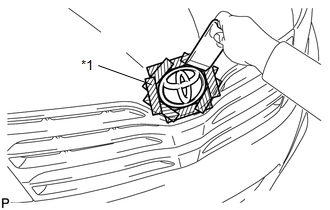
(b) Using a moulding remover, peel off the double-sided tape to remove the hood emblem.
NOTICE:
- If reusing the emblem, take care not to damage the hood emblem.
- Be careful not to damage the vehicle body.
2. REMOVE NO. 1 BACK DOOR EMBLEM
|
(a) Put protective tape around the No. 1 back door emblem. Text in Illustration
|
|
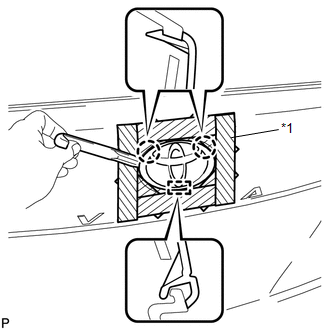
(b) Using a moulding remover, disengage the 2 claws.
NOTICE:
- If reusing the emblem, take care not to damage the No. 1 back door emblem.
- Be careful not to damage the vehicle body.
(c) Disengage the guide and remove the No. 1 back door emblem.
3. REMOVE NO. 2 BACK DOOR NAME PLATE
|
(a) Put protective tape around the No. 2 back door name plate. Text in Illustration
|
|
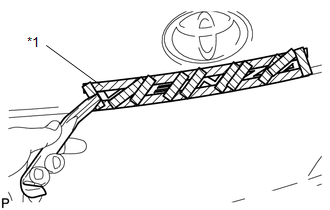
(b) Using a moulding remover, peel off the double-sided tape to remove the No. 2 back door name plate.
NOTICE:
- If reusing the name plate, take care not to damage the No. 2 back door name plate.
- Be careful not to damage the vehicle body.
4. REMOVE NO. 3 BACK DOOR NAME PLATE (for AWD)
|
(a) Put protective tape around the No. 3 back door name plate. Text in Illustration
|
|
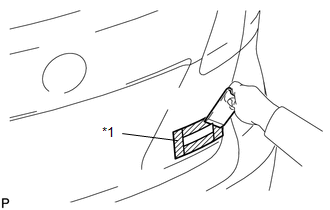
(b) Using a moulding remover, peel off the double-sided tape to remove the No. 3 back door name plate.
NOTICE:
- If reusing the name plate, take care not to damage the No. 3 back door name plate.
- Be careful not to damage the vehicle body.
5. REMOVE NO. 4 LUGGAGE COMPARTMENT DOOR PLATE (w/ Grade Mark)
|
(a) Put protective tape around the No. 4 luggage compartment door plate. Text in Illustration
|
|
(b) Using a moulding remover, peel off the double-sided tape to remove the No. 4 luggage compartment door plate.
NOTICE:
- If reusing the door plate, take care not to damage the No. 4 luggage compartment door plate.
- Be careful not to damage the vehicle body.
 Components
COMPONENTS
ILLUSTRATION
...
 Installation
INSTALLATION
CAUTION / NOTICE / HINT
HINT:
When installing new name plates and emblem, heat the vehicle body, name plates
and emblem using a heat light.
Heating Temperature
Item
...
Other materials about Toyota Venza:
Diagnosis System
DIAGNOSIS SYSTEM
1. DESCRIPTION
(a) Sliding roof system data and Diagnostic Trouble Codes (DTCs) can be read
through the vehicle Data Link Connector 3 (DLC3). When the system seems to be malfunctioning,
use the Techstream to check for malfunctions and pe ...
IG Signal Circuit
DESCRIPTION
This circuit detects the ignition switch ON or off condition, and sends it to
the main body ECU (driver side junction block assembly).
WIRING DIAGRAM
CAUTION / NOTICE / HINT
NOTICE:
Inspect the fuses for circuits related to this system b ...
Personal/interior lights
► Front
On/off
The illuminated entry system is activated even if the light is turned off when
the personal/interior light main switch is in door position.
► Rear
On/off
The illuminated entry system is activated even if the light is turne ...

0.1487