
Toyota Venza: Rear Wheel House Plate
Components
COMPONENTS
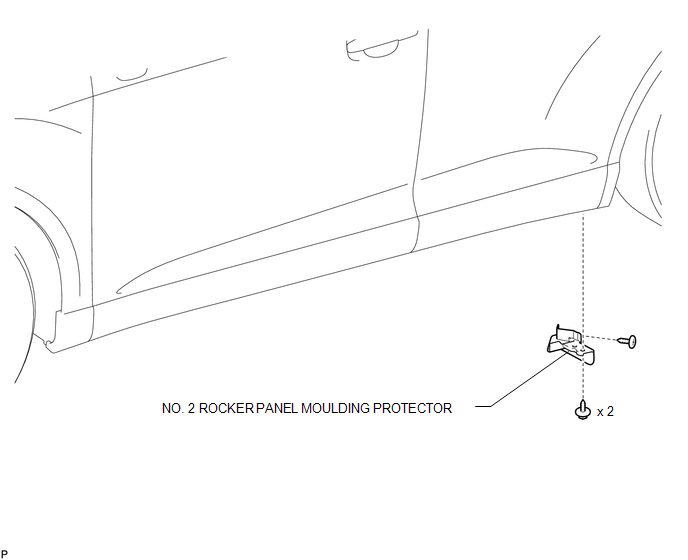
ILLUSTRATION
Installation
INSTALLATION
PROCEDURE
1. INSTALL NO. 2 ROCKER PANEL MOULDING PROTECTOR
|
(a) Install the No. 2 rocker panel moulding protector with the 2 screws <B>. |
|
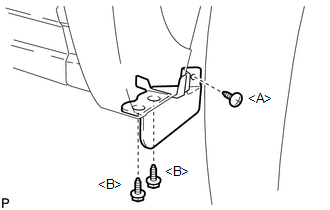
(b) Install the screw <A>.
Removal
REMOVAL
PROCEDURE
1. REMOVE NO. 2 ROCKER PANEL MOULDING PROTECTOR
|
(a) Remove the screw <A>. |
|
.png)
(b) Remove the 2 screws <B> and remove the No. 2 rocker panel moulding protector.
 Rear Spoiler
Components
COMPONENTS
ILLUSTRATION
Removal
REMOVAL
PROCEDURE
1. REMOVE UPPER BACK WINDOW PANEL TRIM
2. REMOVE REAR SPOILER ASSEMBLY
(a) Disconnect the connector.
...
 Rocker Panel Moulding
Components
COMPONENTS
ILLUSTRATION
Removal
REMOVAL
PROCEDURE
1. REMOVE FRONT FENDER OUTSIDE MOULDING
2. REMOVE NO. 2 ROCKER PANEL MOULDING PROTECTOR
3. REMOVE REAR ROCKER PANEL MOU ...
Other materials about Toyota Venza:
Diagnostic Trouble Code Chart
DIAGNOSTIC TROUBLE CODE CHART
Intuitive Parking Assist System
DTC Code
Detection Item
See page
C1AE1
Front Left Sensor Malfunction
C1AE4
Front Right Sensor ...
Window Defogger Wire
On-vehicle Inspection
ON-VEHICLE INSPECTION
PROCEDURE
1. CHECK REAR WINDOW DEFOGGER SYSTEM OPERATION
(a) When the ignition switch is turned to ON and the rear window defogger switch
is pressed, check that the rear window defogger system operates.
2. I ...
Precaution
PRECAUTION
1. PRECAUTION FOR DISCONNECTING CABLE FROM NEGATIVE BATTERY TERMINAL
NOTICE:
When disconnecting the cable from the negative (-) battery terminal, initialize
the following system after the terminal is reconnected:
System Name
...

0.1284