
Toyota Venza: Disassembly
DISASSEMBLY
PROCEDURE
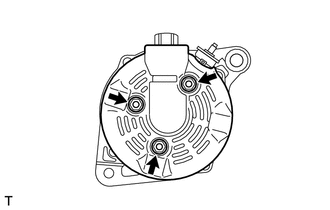
1. REMOVE GENERATOR REAR END COVER
|
(a) Remove the 3 nuts and generator rear end cover. |
|
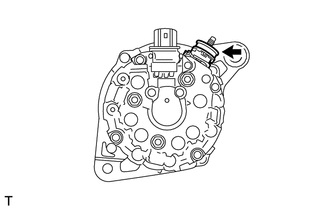
2. REMOVE TERMINAL INSULATOR
|
(a) Remove the terminal insulator from the generator coil. |
|
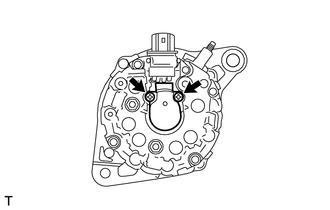
3. REMOVE GENERATOR BRUSH HOLDER ASSEMBLY
|
(a) Remove the 2 screws and brush holder from the generator coil. |
|
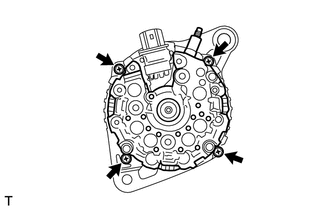
4. REMOVE GENERATOR COIL ASSEMBLY
|
(a) Remove the 4 bolts. |
|
|
(b) Using SST, remove the generator coil assembly. Text in Illustration
SST: 09950-40011 09951-04020 09952-04010 09953-04020 09954-04010 09955-04071 09957-04010 09958-04011 |
|
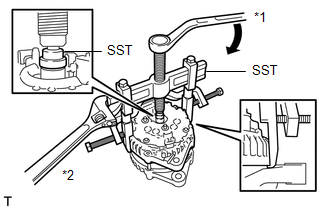
|
(c) Remove the generator washer. |
|
.png)
5. REMOVE GENERATOR CLUTCH PULLEY
|
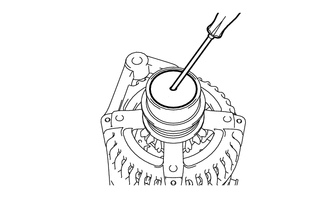
(a) Using a screwdriver, remove the generator pulley cap. NOTICE: Do not reuse the generator pulley cap. |
|
(b) Mount the generator drive end frame in a vise tightly.
|
(c) Confirm SST (A) and (B) shown in the illustration. Text in Illustration
SST: 09820-63021 |
|
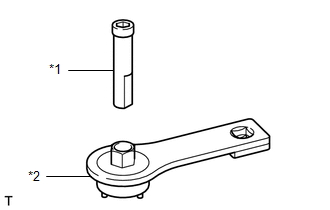
|
(d) Place the rotor shaft end into SST (A). Text in Illustration
|
|
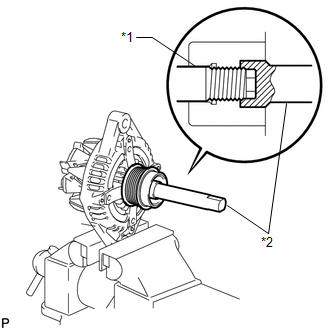
|
(e) Fit SST (B) to the clutch pulley. Text in Illustration
|
|
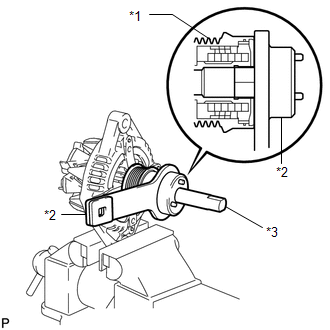
|
(f) Loosen the pulley by turning SST (B) in the direction shown in the illustration. Text in Illustration
NOTICE:
|
|
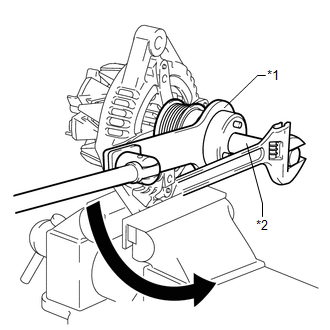
(g) Remove SST from the generator assembly.
(h) Remove the clutch pulley from the rotor shaft.
6. REMOVE GENERATOR ROTOR ASSEMBLY
|
(a) Remove the generator rotor assembly. |
|
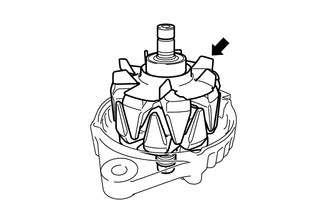
 Removal
REMOVAL
PROCEDURE
1. DISCONNECT CABLE FROM NEGATIVE BATTERY TERMINAL
NOTICE:
When disconnecting the cable, some systems need to be initialized after the cable
is reconnected (See page ).
2. RE ...
 Inspection
INSPECTION
PROCEDURE
1. INSPECT GENERATOR CLUTCH PULLEY
(a) Hold the generator rotor using SST, and turn the clutch pulley clockwise
to check that the outer ring locks.
SST: 09820 ...
Other materials about Toyota Venza:
AV Signal Stoppage (Low Battery Voltage) (B158F)
DESCRIPTION
This DTC is stored when a video or audio signal is interrupted due to battery
voltage input to the navigation receiver assembly dropping temporarily.
DTC No.
DTC Detection Condition
Trouble Area
...
Components
COMPONENTS
ILLUSTRATION
ILLUSTRATION
ILLUSTRATION
ILLUSTRATION
ILLUSTRATION
...
System Diagram
SYSTEM DIAGRAM
Communication Table
Sender
Receiver
Signal
Line
Main body ECU (Driver side junction block assembly)
Sliding roof ECU (Sliding roof drive gear sub-assembly)
Key ...

0.1255