
Toyota Venza: Components
COMPONENTS
ILLUSTRATION
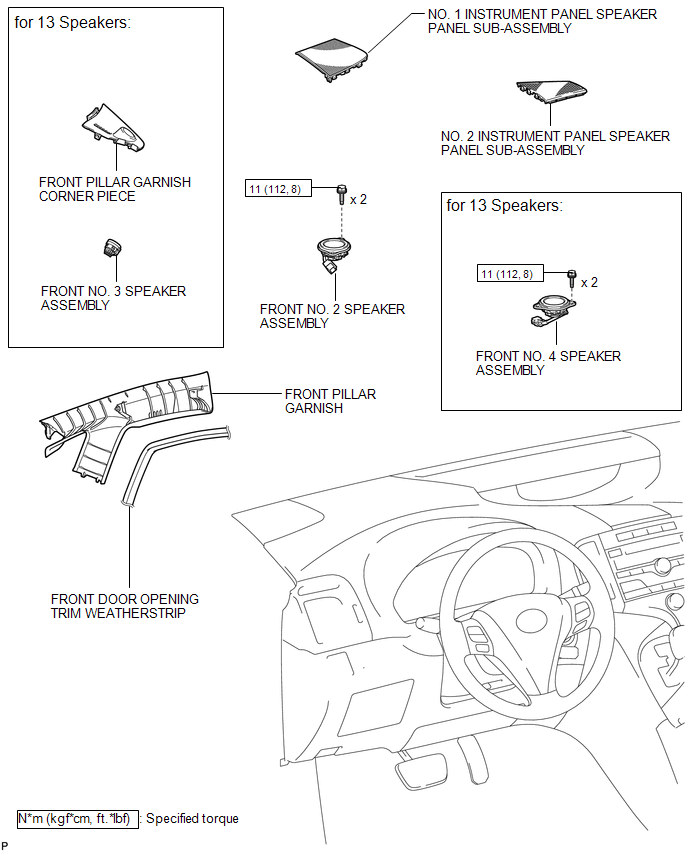

 Removal
REMOVAL
PROCEDURE
1. DISCONNECT FRONT DOOR OPENING TRIM WEATHERSTRIP
2. REMOVE FRONT PILLAR GARNISH
3. REMOVE NO. 2 INSTRUMENT PANEL SPEAKER PANEL SUB-ASSEMBLY
4. REMOVE FRONT NO. 4 SPEA ...
Other materials about Toyota Venza:
Audio system types
► Vehicles with Display Audio system
Type A
Type B
Refer to the “Display Audio System Owner’s Manual”.
► Vehicles with a navigation system
Refer to the “Navigation System Owner’s Manual”. ...
Installation
INSTALLATION
PROCEDURE
1. ADJUST COMPRESSOR OIL LEVEL
(a) When replacing the cooler compressor assembly with a new one, gradually
discharge the inert gas (helium) from the service valve, and drain the following
amount of oil from the vent ...
Initialization
INITIALIZATION
1. RESET BACK DOOR CLOSE POSITION
NOTICE:
Perform initialization of the power back door system (power back door ECU initialization)
if one of the following is performed:
The cable is disconnected from the negative (-) battery termin ...

0.1424