
Toyota Venza: Installation
INSTALLATION
CAUTION / NOTICE / HINT
HINT:
- Use the same procedure for the LH side and RH side.
- The following procedure is for the LH side.
- If the sensor rotor needs to be replaced, replace it together with the rear drive shaft assembly.
PROCEDURE
1. INSTALL REAR SPEED SENSOR
|
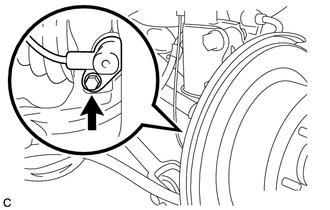
(a) Install the rear speed sensor with the bolt. Torque: 8.5 N·m {87 kgf·cm, 75 in·lbf} NOTICE:
|
|
|
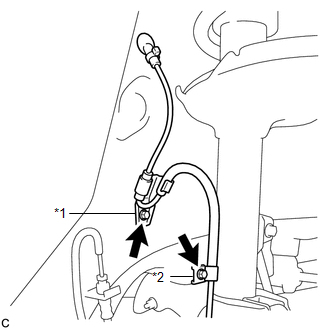
(b) Install the No. 1 clamp and No. 2 clamp with the 2 bolts. Torque: 8.0 N·m {82 kgf·cm, 71 in·lbf} NOTICE: Do not twist the rear speed sensor wire when installing the clamps. Text in Illustration
|
|
(c) Insert the connector and grommet to the inside of the vehicle through the passage hole in the wheel well.
NOTICE:
Make sure that the grommet's band clamp remains on the outside of the vehicle.
(d) Hold the grommet and pull it from the inside to the outside of the vehicle. Then secure it in place so that it is not tilted.
NOTICE:
When pulling out the grommet, do not grip the sensor wire.
|
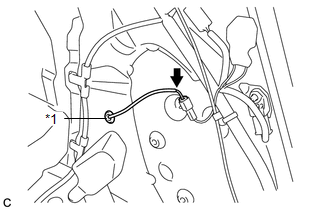
(e) Connect the rear speed sensor connector. Text in Illustration
|
|
2. INSTALL DECK TRIM SIDE PANEL ASSEMBLY LH
.gif)
3. CONNECT REAR SEAT OUTER BELT ASSEMBLY LH
4. INSTALL LUGGAGE HOLD BELT STRIKER ASSEMBLY
5. INSTALL RECLINING REMOTE CONTROL BEZEL LH
6. INSTALL REAR FLOOR FINISH PLATE
7. INSTALL REAR SEAT SUB FLOOR PANEL ASSEMBLY
8. INSTALL NO. 1 DECK BOARD
9. INSTALL DECK SIDE TRIM BOX RH
10. INSTALL NO. 2 DECK BOARD SUB-ASSEMBLY
11. INSTALL DECK SIDE TRIM BOX LH
12. INSTALL NO. 3 DECK BOARD SUB-ASSEMBLY
13. INSTALL DECK BOARD ASSEMBLY
14. INSTALL TONNEAU COVER ASSEMBLY (w/ Tonneau Cover)
15. INSTALL REAR DOOR OPENING TRIM WEATHERSTRIP LH
16. INSTALL REAR DOOR SCUFF PLATE LH
17. CONNECT CABLE TO NEGATIVE BATTERY TERMINAL
NOTICE:
When disconnecting the cable, some systems need to be initialized after the cable
is reconnected (See page ).
18. CHECK FOR SPEED SENSOR SIGNAL
HINT:
(See page ).
 Components
COMPONENTS
ILLUSTRATION
ILLUSTRATION
ILLUSTRATION
...
 Removal
REMOVAL
CAUTION / NOTICE / HINT
HINT:
Use the same procedure for the LH side and RH side.
The following procedure is for the LH side.
If the sensor rotor needs to be replaced, repla ...
Other materials about Toyota Venza:
Ambient Temperature Sensor
Components
COMPONENTS
ILLUSTRATION
Inspection
INSPECTION
PROCEDURE
1. INSPECT AMBIENT TEMPERATURE SENSOR
(a) Measure the resistance according to the value(s) in the table below.
Standard Resistance:
Tester Connection
C ...
Mass Air Flow Meter
Components
COMPONENTS
ILLUSTRATION
On-vehicle Inspection
ON-VEHICLE INSPECTION
CAUTION / NOTICE / HINT
NOTICE:
Perform the mass air flow meter inspection according to the procedure
below.
Only replace the mass air flow meter when t ...
Inspection
INSPECTION
PROCEDURE
1. INSPECT COURTESY LIGHT SWITCH
(a) Measure the resistance according to the value(s) in the table below.
Standard Resistance:
Tester Connection
Switch Condition
Specified Condition
...

0.1398