
Toyota Venza: Turn signal lever
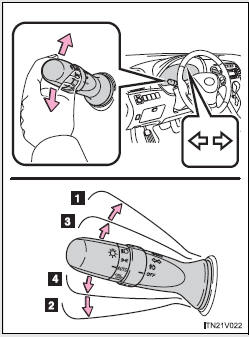
1. Right turn
2. Left turn
3. Move and hold the lever partway to signal a lane change.
The right hand signal will flash until you release the lever.
4. Move and hold the lever partway to signal a lane change.
The left hand signal will flash until you release the lever.
- Turn signals can be operated when
►Vehicles with smart key system The “ENGINE START STOP” switch is in IGNITION ON mode.
►Vehicles without smart key system The engine switch is in the “ON” position.
- If the indicators flash faster than usual
Check that a light bulb in the front or rear turn signal lights has not burned out.
 Automatic transmission
Select a shift position appropriate for the driving conditions.
- Shifting the shift lever
Vehicles with smart key system:
While the “ENGINE START STOP” switch is in IGNITION ON mode, d ...
 Parking brake
Sets the parking brake* (Depressing the pedal again releases the parking brake.)
*: Fully depress the parking brake pedal with your left foot while depressing
the brake pedal with your right foot ...
Other materials about Toyota Venza:
Removal
REMOVAL
PROCEDURE
1. REMOVE UPPER CONSOLE PANEL SUB-ASSEMBLY (w/o Seat Heater System)
2. REMOVE UPPER CONSOLE PANEL SUB-ASSEMBLY (w/ Seat Heater System)
3. REMOVE NO. 2 CONSOLE BOX CARPET
(a) Remove the No. 2 console box carpet.
...
Replacement
REPLACEMENT
PROCEDURE
1. RECOVER REFRIGERANT FROM REFRIGERATION SYSTEM
(a) Start up the engine.
(b) Turn the A/C switch on.
(c) Operate the cooler compressor at an engine speed of approximately 1000 rpm
for 5 to 6 minutes to circulate the refrigerant. T ...
Throttle Actuator Control Motor Current Range / Performance (P2118)
DESCRIPTION
The electronic throttle control system has a dedicated power supply circuit.
The voltage (+BM) is monitored and when it is low (below 4 V), the ECM determines
that there is a malfunction in the electronic throttle control system and cuts off
...

0.1129