
Toyota Venza: Removal
REMOVAL
PROCEDURE
1. REMOVE PARKING BRAKE PEDAL ASSEMBLY
HINT:
Refer to the instructions for Removal of the parking brake pedal assembly (See
page .gif) ).
).
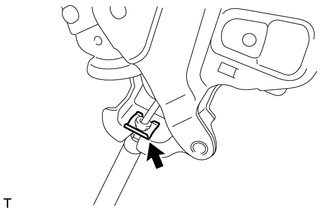
2. REMOVE NO. 1 PARKING BRAKE CABLE ASSEMBLY
|
(a) Remove the clip. |
|
|
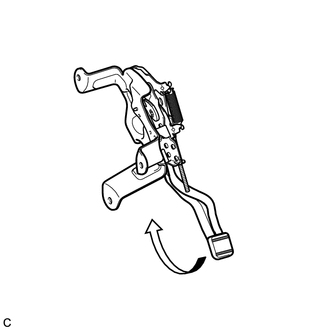
(b) Depress the parking brake pedal. |
|
|
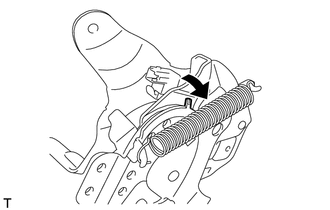
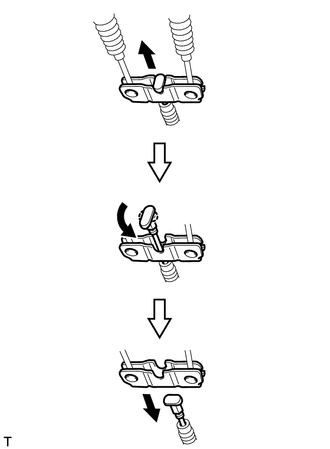
(c) Pull up the parking brake pedal claw and remove the No. 1 parking brake cable assembly from the parking brake pedal assembly. |
|
3. REMOVE REAR WHEEL
4. REMOVE NO. 4 PARKING BRAKE CABLE ASSEMBLY
|
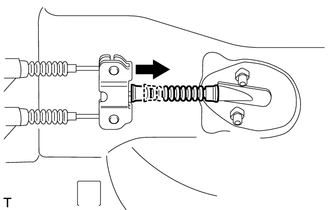
(a) Slide the rubber boot as shown in the illustration. |
|
|
(b) Separate the No. 4 parking brake cable assembly from the parking brake equalizer as shown in the illustration. |
|
|
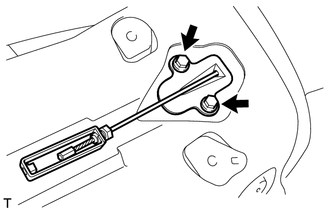
(c) Remove the 2 bolts and No. 4 parking brake cable assembly. |
|
5. REMOVE PARKING BRAKE EQUALIZER
|
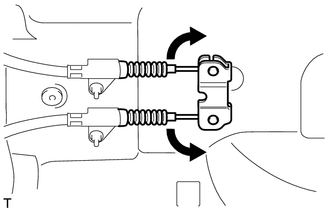
(a) Move the No. 2 parking brake cable assembly and No. 3 parking brake cable assembly as shown in the illustration to remove the parking brake equalizer. |
|
6. REMOVE NO. 2 PARKING BRAKE SHOE ASSEMBLY WITH PARKING BRAKE SHOE LEVER
HINT:
Refer to the instructions for Removal of the No. 2 parking brake shoe assembly
with parking brake shoe lever (See page ).
7. REMOVE NO. 3 PARKING BRAKE CABLE ASSEMBLY
|
(a) Remove the 2 bolts and separate the No. 3 parking brake cable assembly from the backing plate. |
|
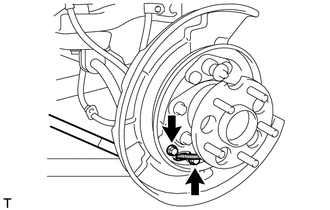
(b) Remove the bolt, 4 nuts and the No. 3 parking brake cable assembly.
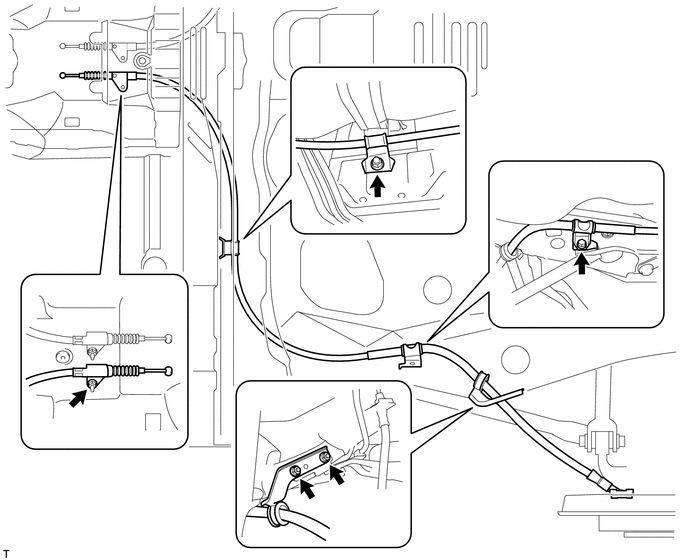
8. REMOVE NO. 2 PARKING BRAKE CABLE ASSEMBLY
HINT:
Use the same procedure as for the No. 3 parking brake cable assembly.
 Components
COMPONENTS
ILLUSTRATION
ILLUSTRATION
ILLUSTRATION
...
 Installation
INSTALLATION
PROCEDURE
1. INSTALL NO. 3 PARKING BRAKE CABLE ASSEMBLY
(a) Install the No. 3 parking brake cable assembly with the bolt and 4 nuts.
Torque:
Nut (A) :
5.4 N·m {55 kgf·cm, 48 i ...
Other materials about Toyota Venza:
System Diagram
SYSTEM DIAGRAM
Communication Table
Transmitting ECU (Transmitter)
Receiving ECU (Receiver)
Signal
Line
Main body ECU
(Driver side junction block assembly)
Power Back Door ECU
(P ...
Vehicle Speed Signal Error (Test Mode DTC) (C2191/91)
DESCRIPTION
The tire pressure warning ECU receives a vehicle speed signal from the combination
meter. This DTC is stored upon entering signal check mode (test mode), and cleared
when a vehicle speed signal of 20 km/h (12 mph) is detected for 3 seconds or ...
Installing child restraints using a seat belt (child restraint lock function
belt)
- Rear-facing -- Infant seat/convertible seat
Place the child restraint system on the rear seat facing the rear of the vehicle.
Run the seat belt through the child restraint system and insert the plate into
the buckle. Make sure that the belt is ...

0.1271