
Toyota Venza: Luggage compartment features
- Cargo hooks
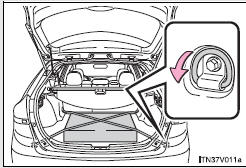
Cargo hooks are provided for securing loose items.
- Shopping bag hooks
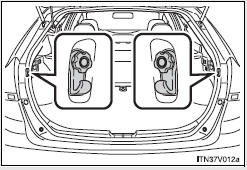
- Auxiliary box
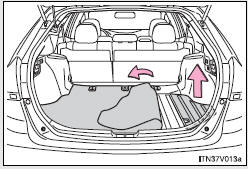
Lift the right side deck board.
- Luggage cover
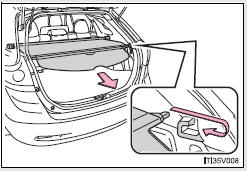
Pull out the luggage cover and hook it on the anchors.
Removing luggage cover
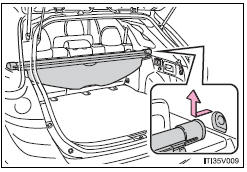
Retract the cover and release both ends, then lift it out.
After removing the luggage cover, place it somewhere other than the passenger compartment.
CAUTION
- When the cargo hooks are not in use
To avoid injury, always return the cargo hooks to their positions when they are not in use.
- While driving
Do not place anything on the luggage cover. Such items may be thrown about and possibly injure people in the vehicle during sudden braking, sudden swerving or an accident.
 Floor mats
Use only floor mats designed specifically for vehicles of the same model and
model year as your vehicle. Fix them securely in place onto the carpet.
Insert the retaining hooks (clips) into the fl ...
 Garage door opener
The garage door opener can be programmed to operate garage doors, gates, entry
doors, door locks, home lighting systems, security systems, and other devices.
The garage door opener (HomeLink® Univ ...
Other materials about Toyota Venza:
Drive Shaft System
Precaution
PRECAUTION
1. NOTICE OF REMOVING AND INSTALLING FRONT DRIVE SHAFT ASSEMBLY RH
(a) When removing and installing the front drive shaft assembly RH in a AWD vehicle,
be sure to first drain all the transaxle oil and transfer oil. If removal and i ...
TRAC OFF Indicator Light does not Come ON
DESCRIPTION
The skid control ECU is connected to the combination meter via CAN communication.
WIRING DIAGRAM
Refer to TRAC OFF Indicator Light Remains ON (See page
).
PROCEDURE
1.
CHECK CAN COMMUNICATION SYSTEM
(a) Check ...
On-vehicle Inspection
ON-VEHICLE INSPECTION
PROCEDURE
1. INSPECT REAR WIPER MOTOR AND BRACKET ASSEMBLY
(a) Operate the rear wiper motor and bracket assembly.
(b) Stop the rear wiper motor and bracket assembly operation.
...

0.1496