
Toyota Venza: Locking and unlocking the doors and key linked functions
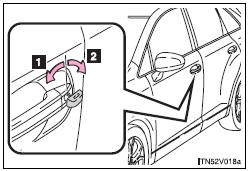
Using the mechanical key in order to perform the following operations.
1. Locks all doors
2. Unlocks all doors
Turning the key rearward unlocks the driver’s door. Turning the key once again within 3 seconds unlocks the other doors.
 If the electronic key does not operate properly (vehicles with smart key system)
If communication between the electronic key and vehicle is interrupted or the electronic key cannot be used because the battery is depleted, the smart
key system and wireless remote control cannot b ...
 Starting the engine
Shift the shift lever to “P” and
apply the brakes.
Touch the Toyota emblem side of the electronic key to the “ENGINE START STOP”
switch.
An alarm will sound to indicate that the start ...
Other materials about Toyota Venza:
Data List / Active Test
DATA LIST / ACTIVE TEST
1. DATA LIST
HINT:
Using the Techstream to read the Data List allows the values or states of switches,
sensors, actuators and other items to be read without removing any parts. This non-intrusive
inspection can be very useful bec ...
Removal
REMOVAL
PROCEDURE
1. REMOVE FRONT SEAT HEADREST ASSEMBLY
2. REMOVE FRONT SEAT REAR OUTER TRACK COVER
3. REMOVE FRONT SEAT REAR INNER TRACK COVER
4. REMOVE FRONT SEAT ASSEMBLY
5. REMOVE RECLINING POWER SEAT SWITCH KNOB
6. REMOVE SLIDE AND VER ...
Removal
REMOVAL
PROCEDURE
1. REMOVE REAR SEAT HEADREST ASSEMBLY
(a) Press the headrest support button and pull up the rear seat headrest
assembly as shown in the illustration.
2. REMOVE REAR SEAT CENTER ...

0.1892