
Toyota Venza: Installation
INSTALLATION
PROCEDURE
1. INSTALL INSTRUMENT PANEL WIRE ASSEMBLY
|
(a) Connect the vent hole connector of the instrument panel wire to the front passenger airbag assembly. Text in Illustration
NOTICE: When connecting any airbag connector, take care not to damage the airbag wire harness. |
|
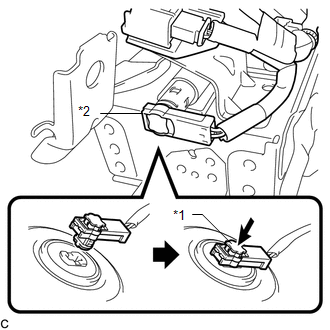
(b) Push in the vent hole connector lock to install the vent hole connector.
|
(c) Connect the 2 airbag connectors of the instrument panel wire to the front passenger airbag assembly. Text in Illustration
NOTICE:
|
|
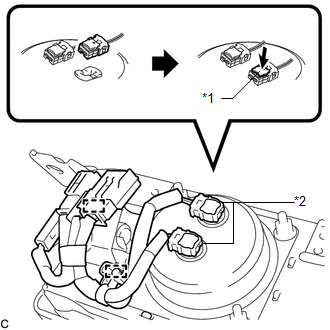
(d) Push in the 2 airbag connector locks to install the 2 airbag connectors.
(e) Engage the 2 clamps.
2. INSTALL FRONT PASSENGER AIRBAG ASSEMBLY
(a) Engage the 5 hooks.
(b) Push in the front passenger airbag assembly to engage the 5 hooks.
(c) Install the 2 screws to install the front passenger airbag assembly.
3. INSTALL INSTRUMENT PANEL SAFETY PAD ASSEMBLY
.gif)
4. CONNECT INSTRUMENT PANEL WIRE ASSEMBLY
(a) Check that the ignition switch is off.
(b) Check that the cable is disconnected from the negative (-) battery terminal.
CAUTION:
Wait at least 90 seconds after disconnecting the cable from the negative (-) battery terminal to disable the SRS system.
|
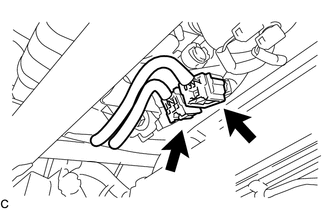
(c) Connect the 2 connectors. NOTICE: When connecting the airbag connector, take care not to damage the airbag wire harness. |
|
5. INSTALL SHIFT LEVER ASSEMBLY
(See page )
6. PERFORM DIAGNOSTIC SYSTEM CHECK
(See page )
7. INSPECT SRS WARNING LIGHT
(See page )
 Removal
REMOVAL
PROCEDURE
1. PRECAUTION
NOTICE:
Be sure to read Precaution thoroughly before servicing (See page
).
2. REMOVE SHIFT LEVER ASSEMBLY
(See page )
3. DISCONNECT INSTRUMENT PANEL WIRE ASS ...
 Disposal
DISPOSAL
CAUTION / NOTICE / HINT
CAUTION:
Before performing pre-disposal deployment of any SRS component, review and closely
follow all applicable environmental and hazardous material regulations ...
Other materials about Toyota Venza:
Removal
REMOVAL
PROCEDURE
1. REMOVE RADIATOR ASSEMBLY AND FAN ASSEMBLY WITH MOTOR
HINT:
See page
2. REMOVE FAN
(a) Remove the nut and fan.
3. REMOVE NO. 2 FAN
(a) Remove the nut and No. 2 f ...
Cruise Control Input Circuit (P0575)
DESCRIPTION
This DTC indicates the internal abnormalities of the ECM.
DTC
DTC Detection Condition
Trouble Area
P0575
When both of the following conditions are met:
STP signals input t ...
Pressure Control Solenoid "B" Performance (Shift Solenoid Valve SL2) (P0776)
SYSTEM DESCRIPTION
The TCM uses the vehicle speed signal and signals from the transmission speed
sensors (NC, NT) to detect the actual gear (1st, 2nd, 3rd, 4th, 5th or 6th gear).
Then the TCM compares the actual gear with the shift schedule in the TCM memo ...

0.1359