
Toyota Venza: Installation
INSTALLATION
PROCEDURE
1. INSTALL POWER STEERING ECU ASSEMBLY
|
(a) Engage the 4 wire harness clamps to the power steering ECU assembly. |
|
.png)
|
(b) Install the power steering ECU assembly with the 3 nuts. Torque: 14 N·m {138 kgf·cm, 10 ft·lbf} |
|
.png)
|
(c) Securely connect the connector to the power steering ECU assembly. HINT: Return the lock lever to its original position to connect the connector, and then securely push in the lock of the lock lever as shown in the illustration . |
|
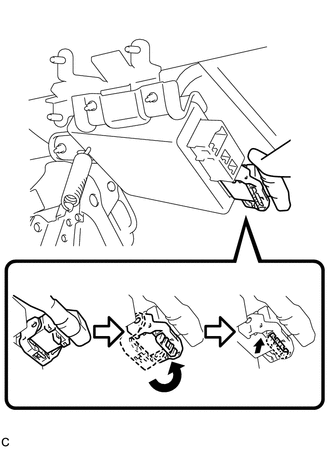
|
(d) Connect the 3 connectors to the power steering ECU assembly. |
|
.png)
2. INSTALL DRIVER SIDE JUNCTION BLOCK ASSEMBLY
|
(a) Engage the 2 claws to install the driver side junction block assembly. |
|
.png)
(b) Connect the connectors to the back of the driver side junction block assembly.
|
(c) Install the driver side junction block assembly with the 3 nuts. Torque: 8.0 N·m {82 kgf·cm, 71 in·lbf} |
|
.png)
(d) Connect the connectors to the driver side junction block assembly.
3. INSTALL DRIVER SIDE KNEE AIRBAG ASSEMBLY
HINT:
Refer to the instructions for Installation of the knee airbag assembly (See page
.gif) ).
).
4. CONNECT CABLE TO NEGATIVE BATTERY TERMINAL
NOTICE:
When disconnecting the cable, some systems need to be initialized after the cable
is reconnected (See page ).
5. INITIALIZE ROTATION ANGLE SENSOR AND CALIBRATE TORQUE SENSOR ZERO POINT
(a) If replacing the power steering ECU assembly, clear the rotation angle sensor
calibration value, initialize the rotation angle sensor, and calibrate the torque
sensor zero point (See page ).
 Removal
REMOVAL
CAUTION / NOTICE / HINT
CAUTION:
Some of these service operations affect the SRS airbag system. Read the precautionary
notices concerning the SRS airbag system before servicing (See page
...

Other materials about Toyota Venza:
Slide Sensor Malfunction (B2650)
DESCRIPTION
When the position control ECU and switch assembly does not receive a sensor signal
despite forward or backward movement of seat by power seat motor operation, this
DTC is output.
DTC Code
DTC Detection Condition
...
Sleep Operation Failure of Occupant Classification ECU (B1796)
DESCRIPTION
In sleep mode, the occupant classification ECU reads the condition of each sensor
while the ignition switch is off.
In this mode, if occupant classification ECU detects an internal malfunction,
DTC B1796 is output.
DTC No.
...
Terminals Of Ecu
TERMINALS OF ECU
1. CHECK MAIN BODY ECU (DRIVER SIDE JUNCTION BLOCK ASSEMBLY)
(a) Disconnect the 2A, 2C and 2F main body ECU (driver side junction block assembly)
connectors.
(b) Measure the voltage and resistance according to the value(s) in the table ...

0.1192