
Toyota Venza: Ignition Switch
Components
COMPONENTS
ILLUSTRATION
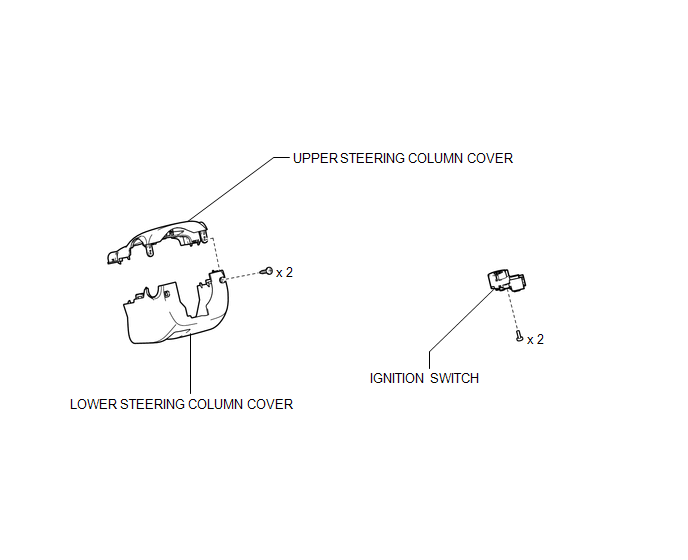
Removal
REMOVAL
PROCEDURE
1. REMOVE LOWER STEERING COLUMN COVER
.gif)
2. REMOVE UPPER STEERING COLUMN COVER
3. REMOVE IGNITION SWITCH
|
(a) Remove the 2 screws and ignition switch. |
|
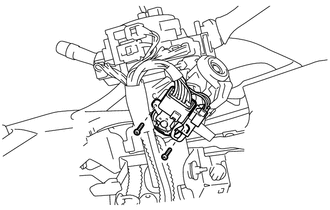
|
(b) Disconnect the connector. |
|
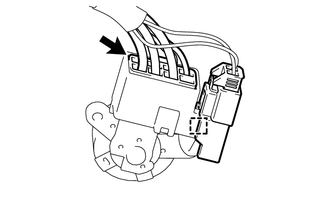
(c) Disconnect the connector clamp from the ignition switch.
Inspection
INSPECTION
PROCEDURE
1. INSPECT IGNITION SWITCH
|
(a) Measure the switch resistance. Standard Resistance:
If the result is not as specified, replace the switch assembly. |
|
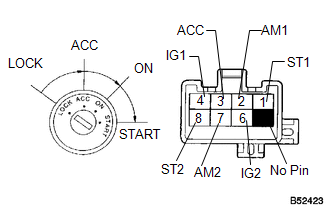
Installation
INSTALLATION
PROCEDURE
1. INSTALL IGNITION SWITCH
|
(a) Connect the connector. |
|
.png)
(b) Install the connector clamp to the ignition switch.
|
(c) Install the ignition switch with the 2 screws. |
|
.png)
2. INSTALL UPPER STEERING COLUMN COVER
.gif)
3. INSTALL LOWER STEERING COLUMN COVER
 Installation
INSTALLATION
PROCEDURE
1. INSTALL ENGINE SWITCH
(a) Attach the 2 claws to install the engine switch.
2. INSTALL LOWER INSTRUMENT PANEL FI ...
 Relay
Relay
On-vehicle Inspection
ON-VEHICLE INSPECTION
PROCEDURE
1. INSPECT STARTER RELAY
(a) Measure the resistance according to the value(s) in the table below.
Standard Resistance:
...
Other materials about Toyota Venza:
Inspection
INSPECTION
PROCEDURE
1. INSPECT FRONT SEAT CUSHION HEATER LH
(a) Check the seat cushion heater.
(1) Apply battery voltage and check the seat cushion heater.
OK:
Measurement Condition
Condition
...
Noise Occurs or Sound Skips when Portable Player Plays
CAUTION / NOTICE / HINT
HINT:
Perform this check with the portable player volume set at an appropriate
level.
Make sure that there are no obstructions between the portable player
and navigation receiver assembly that may block signals, an ...
System Description
SYSTEM DESCRIPTION
1. FRONT POWER SEAT CONTROL SYSTEM DESCRIPTION
The driver seat is equipped with slide, reclining, lifter, front vertical and
lumbar support adjustment functions.
2. FUNCTION OF MAIN COMPONENTS
The following functions are available:
...

0.1232