
Toyota Venza: Installation
INSTALLATION
PROCEDURE
1. INSTALL RADIATOR ASSEMBLY
|
(a) Install the fan assembly with motor to the radiator with the 2 guides at the bottom and 3 snap fits on the top. Text in Illustration
|
|
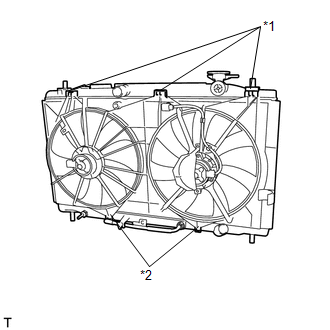
(b) Install the 2 lower radiator supports and 2 radiator support cushions.
|
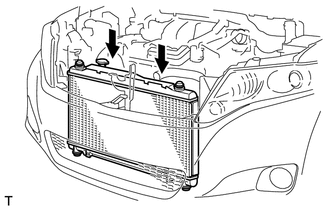
(c) Install the radiator assembly and fan assembly with motor. NOTICE: Do not apply any excessive force to the cooler condenser assembly or pipe when installing the radiator assembly. |
|
|
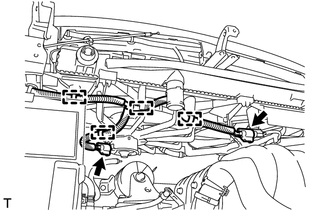
(d) Connect the 4 wire harness clamps and 2 connectors. |
|
2. INSTALL COOLER CONDENSER ASSEMBLY
|
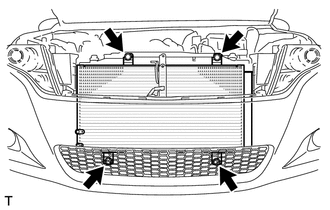
(a) Install the cooler condenser assembly with the 4 bolts. Torque: 5.0 N·m {51 kgf·cm, 44 in·lbf} |
|
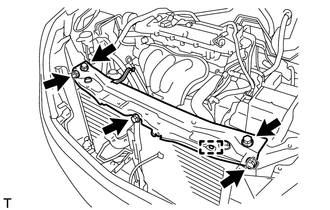
3. INSTALL UPPER RADIATOR SUPPORT
|
(a) Install the upper radiator support with the 5 bolts and connect the hood lock control cable clamp to the upper radiator support. Torque: 12 N·m {122 kgf·cm, 9 ft·lbf} |
|
4. CONNECT OUTLET NO. 1 OIL COOLER HOSE
|
(a) Connect the outlet No. 1 oil cooler hose to the radiator. |
|
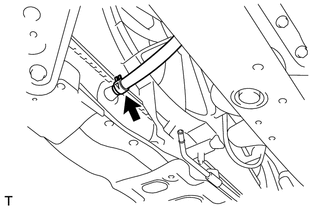
5. CONNECT INLET NO. 1 OIL COOLER HOSE
|
(a) Connect the inlet No. 1 oil cooler hose to the radiator. |
|
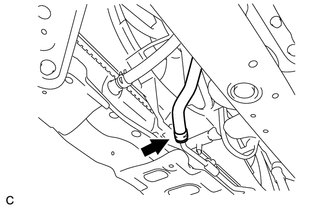
6. INSTALL NO. 2 RADIATOR HOSE
|
(a) Install the No. 2 radiator hose to the engine and radiator. |
|
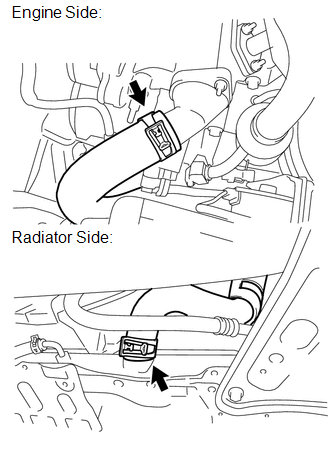
7. CONNECT NO. 1 RADIATOR HOSE
|
(a) Connect the No. 1 radiator hose to the radiator. |
|
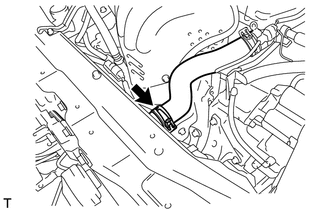
8. CONNECT OUTLET RESERVE TANK HOSE
|
(a) Connect the outlet reserve tank hose to the radiator. |
|
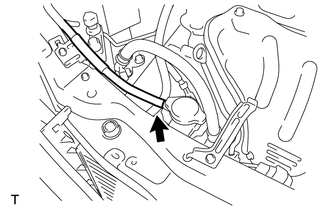
9. INSTALL HOOD LOCK ASSEMBLY (w/o Engine Hood Courtesy Switch)
.gif)
10. INSTALL HOOD LOCK ASSEMBLY (w/ Engine Hood Courtesy Switch)
11. INSTALL LOW PITCHED HORN ASSEMBLY
12. INSTALL HIGH PITCHED HORN ASSEMBLY
13. INSTALL RADIATOR GRILLE
14. INSTALL INLET AIR CLEANER ASSEMBLY
15. ADD ENGINE COOLANT
16. INSPECT FOR COOLANT LEAK
17. INSPECT AUTOMATIC TRANSAXLE FLUID
HINT:
- U760F Automatic transaxle: See page
- U760E Automatic transaxle: See page
18. INSTALL NO. 1 ENGINE UNDER COVER
19. INSTALL NO. 2 ENGINE UNDER COVER
20. INSTALL COOL AIR INTAKE DUCT SEAL
 On-vehicle Inspection
ON-VEHICLE INSPECTION
PROCEDURE
1. CHECK RADIATOR CAP SUB-ASSEMBLY
(a) Measure the valve opening pressure.
(1) If there are water stains or foreign matter on rubber packings 1, 2 or 3,
clean t ...
 Removal
REMOVAL
PROCEDURE
1. REMOVE NO. 1 ENGINE UNDER COVER
2. REMOVE NO. 2 ENGINE UNDER COVER
3. DRAIN ENGINE COOLANT
4. REMOVE COOL AIR INTAKE DUCT SEAL
5. REMOVE INLET AIR CLEANER ASSEMBLY
...
Other materials about Toyota Venza:
If your vehicle overheats
The following may indicate that your vehicle is overheating.
• The engine coolant temperature gauge reaches the maximum, or a loss of
engine power is experienced. (For example, the vehicle speed does not increase.)
• Steam comes out from under the hood ...
Lost Communication with Rear Airbag Sensor LH (B1637/82,B1638/82,B1647/82,B1697/82,B1698/82)
DESCRIPTION
The side collision sensor LH circuit (to determine deployment of the front seat
side airbag assembly LH and curtain shield airbag assembly LH) is composed of the
center airbag sensor assembly, rear airbag sensor LH and side airbag sensor LH.
...
On-vehicle Inspection
ON-VEHICLE INSPECTION
CAUTION / NOTICE / HINT
CAUTION:
Be sure to follow the correct removal and installation procedures of the door
side airbag sensor.
PROCEDURE
1. INSPECT DOOR SIDE AIRBAG SENSOR (VEHICLE NOT INVOLVED IN COLLISION)
(a) Perform a diag ...

0.1458