
Toyota Venza: Installation
INSTALLATION
PROCEDURE
1. INSTALL TELEVISION CAMERA ASSEMBLY (w/ Rear View Monitor System)
.gif)
2. INSTALL BACK DOOR OPENER SWITCH ASSEMBLY
3. INSTALL NO. 1 BACK DOOR EMBLEM
4. INSTALL NO. 2 BACK DOOR NAME PLATE
5. INSTALL BACK DOOR OUTSIDE GARNISH SUB-ASSEMBLY
(a) Install the 5 stud bolts and 5 new gaskets to the back door outside garnish sub-assembly.
(b) Install 16 new clips (back door moulding clip) to the back door outside garnish sub-assembly.
|
(c) Engage the 16 clips to install the back door outside garnish sub-assembly. |
|
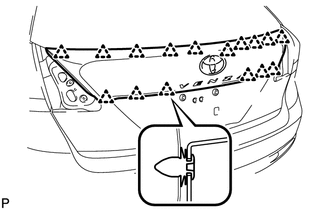
|
(d) Install the 5 nuts. |
|
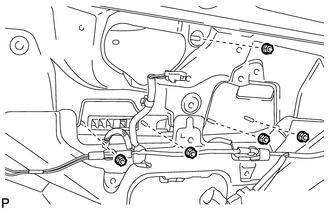
(e) Connect each connector.
6. INSTALL REAR LIGHT ASSEMBLY LH
7. INSTALL REAR LIGHT ASSEMBLY RH
HINT:
Use the same procedure for the RH side and LH side.
8. INSTALL REAR WIPER MOTOR AND BRACKET ASSEMBLY
9. INSTALL REAR WIPER MOTOR GROMMET
10. INSTALL REAR WIPER ARM AND BLADE ASSEMBLY
11. INSTALL REAR WIPER ARM HEAD CAP
12. INSTALL BACK DOOR PANEL TRIM ASSEMBLY
 Components
COMPONENTS
ILLUSTRATION
ILLUSTRATION
...
 Removal
REMOVAL
PROCEDURE
1. REMOVE BACK DOOR PANEL TRIM ASSEMBLY
2. REMOVE REAR WIPER ARM HEAD CAP
3. REMOVE REAR WIPER ARM AND BLADE ASSEMBLY
4. REMOVE REAR WIPER MOTOR GROMMET
5. REMOVE R ...
Other materials about Toyota Venza:
Vehicle Speed Sensor "A" (P0500)
DESCRIPTION
The speed sensors detect the wheel speed and send the appropriate signals to
the skid control ECU. The skid control ECU converts these wheel speed signals into
a 4-pulse signal and outputs it to the TCM via the combination meter. The TCM deter ...
On-vehicle Inspection
ON-VEHICLE INSPECTION
CAUTION / NOTICE / HINT
HINT:
Use the same procedure for the RH side and LH side.
The procedure listed below is for the LH side.
PROCEDURE
1. REMOVE REAR WHEEL
2. SEPARATE REAR DISC BRAKE CALIPER ASSEMBLY
3. RE ...
Side doors
The vehicle can be locked and unlocked using the entry function, wireless
remote control, key or door lock switch.
- Entry function (vehicles with smart key system)
- Wireless remote control
- Key
► Vehicles with smart key system ...

0.1289