
Toyota Venza: Installation
INSTALLATION
PROCEDURE
1. INSTALL POWER STEERING ECU ASSEMBLY
|
(a) Engage the 4 wire harness clamps to the power steering ECU assembly. |
|
.png)
|
(b) Install the power steering ECU assembly with the 3 nuts. Torque: 14 N·m {138 kgf·cm, 10 ft·lbf} |
|
.png)
|
(c) Securely connect the connector to the power steering ECU assembly. HINT: Return the lock lever to its original position to connect the connector, and then securely push in the lock of the lock lever as shown in the illustration . |
|
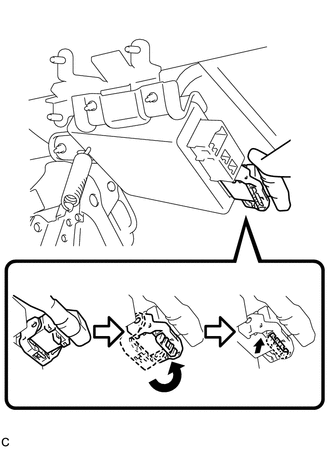
|
(d) Connect the 3 connectors to the power steering ECU assembly. |
|
.png)
2. INSTALL DRIVER SIDE JUNCTION BLOCK ASSEMBLY
|
(a) Engage the 2 claws to install the driver side junction block assembly. |
|
.png)
(b) Connect the connectors to the back of the driver side junction block assembly.
|
(c) Install the driver side junction block assembly with the 3 nuts. Torque: 8.0 N·m {82 kgf·cm, 71 in·lbf} |
|
.png)
(d) Connect the connectors to the driver side junction block assembly.
3. INSTALL DRIVER SIDE KNEE AIRBAG ASSEMBLY
HINT:
Refer to the instructions for Installation of the knee airbag assembly (See page
.gif) ).
).
4. CONNECT CABLE TO NEGATIVE BATTERY TERMINAL
NOTICE:
When disconnecting the cable, some systems need to be initialized after the cable
is reconnected (See page ).
5. INITIALIZE ROTATION ANGLE SENSOR AND CALIBRATE TORQUE SENSOR ZERO POINT
(a) If replacing the power steering ECU assembly, clear the rotation angle sensor
calibration value, initialize the rotation angle sensor, and calibrate the torque
sensor zero point (See page ).
 Removal
REMOVAL
CAUTION / NOTICE / HINT
CAUTION:
Some of these service operations affect the SRS airbag system. Read the precautionary
notices concerning the SRS airbag system before servicing (See page
...

Other materials about Toyota Venza:
Windshield Deicer does not Operate
DESCRIPTION
When the rear window defogger switch on the air conditioning control assembly
is pressed, the operation signal is transmitted to the air conditioning amplifier
assembly through the LIN communication line. When the air conditioning amplifier
...
Adjustment
ADJUSTMENT
PROCEDURE
1. INSPECT TIRES
(a) Inspect the tires (See page ).
2. MEASURE VEHICLE HEIGHT
NOTICE:
Before inspecting the wheel alignment, adjust the vehicle height to
the specified value.
Be sure to perform measurement on a level ...
Transponder Chip Malfunction (B2793)
DESCRIPTION
This DTC is stored when a malfunction is found in the key during key code registration
or a key code is not registered normally. Replace the key if the key code registration
is not performed normally and this DTC is detected.
DTC N ...

0.1409