
Toyota Venza: Inspection
INSPECTION
PROCEDURE
1. INSPECT INNER REAR VIEW MIRROR ASSEMBLY
(a) Inspect operation of the electrochromic inner mirror.
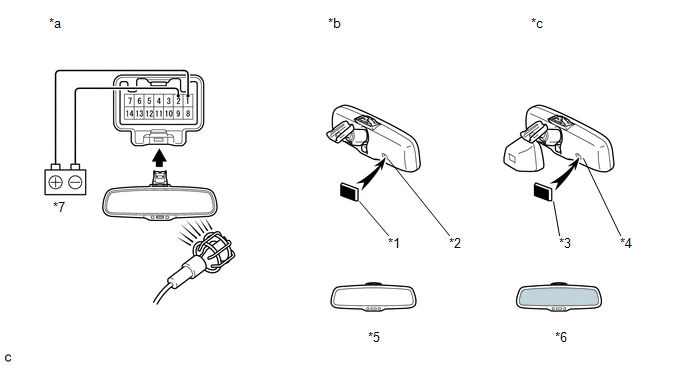
(1) Connect a positive (+) lead from the battery to terminal 1 and a negative (-) lead to terminal 2.
(2) Press the AUTO switch.
(3) Attach black colored tape to the forward sensor to prevent it from sensing.
(4) Light up the mirror with an electric light, and check that the mirror surface changes from bright to dark.
Standard:
Mirror surface changes from bright to dark.
Text in Illustration|
*a |
Component without harness connected |
*b |
w/o Automatic High Beam System |
|
*c |
w/ Automatic High beam System |
*1 |
Block colored Tape |
|
*2 |
Forward Sensor |
*3 |
Block colored Tape |
|
*4 |
Forward Sensor |
*5 |
Bright |
|
*6 |
Dark |
*7 |
Battery |
If the result is not as specified, replace the mirror assembly.
 Problem Symptoms Table
PROBLEM SYMPTOMS TABLE
Use the table below to help determine the cause of problem symptoms. If multiple
suspected areas are listed, the potential causes of the symptoms are listed in order
of pro ...
 Removal
REMOVAL
PROCEDURE
1. REMOVE INNER REAR VIEW MIRROR STAY HOLDER COVER
(a) Disengage the 2 claws and slide the inner rear view mirror stay holder
cover as shown in the illustration.
...
Other materials about Toyota Venza:
Adjustment
ADJUSTMENT
CAUTION / NOTICE / HINT
CAUTION:
Before adjusting the door positions of vehicles equipped with side and curtain
shield airbags, be sure to disconnect the battery. After adjustment, check that
the SRS warning light is operating normally and ...
Cooling Fan Circuit
DESCRIPTION
The ECM turns on or off the fan relays using signals calculated from the engine
coolant temperature, air conditioning (ON/OFF), air conditioner refrigerant pressure,
engine speed, and vehicle speed signals.
The ECM switches the circuit of the ...
Lost Communication with ECM / PCM "A" (U0100,U0129)
DESCRIPTION
The power steering ECU receives signals from the ECM and the brake actuator assembly
(skid control ECU) via the CAN communication system.
DTC No.
DTC Detection Condition
Trouble Area
U0100
...

0.1345