
Toyota Venza: Cruise control
Use the cruise control to maintain a set speed without depressing the accelerator pedal.
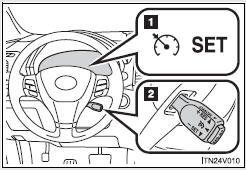
1. Indicators
2. Cruise control switch
- Set the vehicle speed
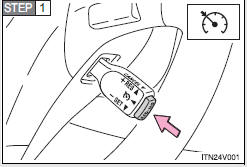
Press the “ON-OFF” button to activate the cruise control.
Cruise control indicator will come on.
Press the button again to deactivate the cruise control.
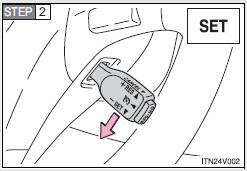
Accelerate or decelerate the vehicle to the desired speed, and push the lever down to set the speed.
Cruise control “SET” indicator will come on.
The vehicle speed at the moment the lever is released becomes the set speed.
- Adjusting the speed setting
To change the set speed, operate the lever until the desired set speed is obtained.
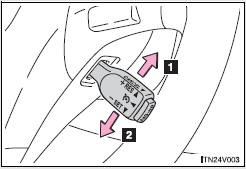
1. Increases speed
2. Decreases speed
Fine adjustment: Momentarily move the lever in the desired direction.
Large adjustment: Hold the lever in the desired direction.
The set speed will be increased or decreased as follows:
Fine adjustment: By approximately 1 mph (1.6 km/h) each time the lever is operated.
Large adjustment: The set speed can be increased or decreased continually until the lever is released.
- Canceling and resuming the constant speed control
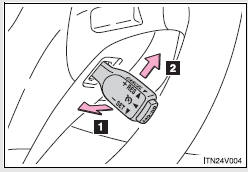
1. Pulling the lever toward you cancels the constant speed control.
The speed setting is also canceled when the brakes are applied.
2. Pushing the lever up resumes the constant speed control.
Resuming is available when the vehicle speed is more than approximately 25 mph (40 km/h).
- Cruise control can be set when
• The shift lever is in D or range 4 or higher of S has been selected.
• Vehicle speed is above approximately 25 mph (40 km/h).
- Accelerating after setting the vehicle speed
• The vehicle can be accelerated normally. After acceleration, the set speed resumes.
• Even without canceling the cruise control, the set speed can be increased by first accelerating the vehicle to the desired speed and then pushing the lever down to set the new speed.
- Automatic cruise control cancelation
Cruise control will stop maintaining the vehicle speed in any of the following situations.
• Actual vehicle speed falls more than approximately 10 mph (16 km/h) below the preset vehicle speed.
At this time, the memorized set speed is not retained.
• Actual vehicle speed is below approximately 25 mph (40 km/h).
• VSC is activated.
- If the cruise control indicator light flashes
Press the “ON-OFF” button once to deactivate the system, and then press the button again to reactivate the system.
If the cruise control speed cannot be set or if the cruise control cancels immediately after being activated, there may be a malfunction in the cruise control system. Have the vehicle inspected by your Toyota dealer.
CAUTION
- To avoid operating the cruise control by mistake
Switch the cruise control off using the “ON-OFF” button when not in use.
- Situations unsuitable for cruise control
Do not use cruise control in any of the following situations.
Doing so may result in loss of control and could cause an accident resulting in death or serious injury.
• In heavy traffic
• On roads with sharp bends
• On winding roads
• On slippery roads, such as those covered with rain, ice or snow
• On steep hills
Vehicle speed may exceed the set speed when driving down a steep hill.
• When your vehicle is towing a trailer or during emergency towing

 Intuitive parking assist
The distance from your vehicle to nearby obstacles when parallel parking or
maneuvering into a garage is measured by the sensors and communicated via the multi-information
display and a buzzer.
A ...
Other materials about Toyota Venza:
Front Passenger Side Door ECU Communication Stop (B2322)
DESCRIPTION
This DTC is stored when LIN communication between the power window regulator
motor assembly (for front passenger side) and main body ECU (driver side junction
block assembly) stops for more than 10 seconds.
DTC No.
DTC D ...
Lost Communication with Clearance Warning ECU (U1110)
DESCRIPTION
DTC Code
DTC Detection Condition
Trouble Area
U1110
No communication from the clearance warning ECU assembly continues.
Clearance warning ECU assembly branch wire o ...
How To Proceed With Troubleshooting
CAUTION / NOTICE / HINT
PRECAUTIONS WHEN TROUBLESHOOTING
NOTICE:
DTCs for the CAN communication system are as follows: U0073, U0100,
U0101, U0123, U0124, U0126, U0129, U0131, U0142, U0155, U0164, U0182, U0199,
U0200, U0208, U0230, U1002 and ...

0.1264