
Toyota Venza: Components
COMPONENTS
ILLUSTRATION
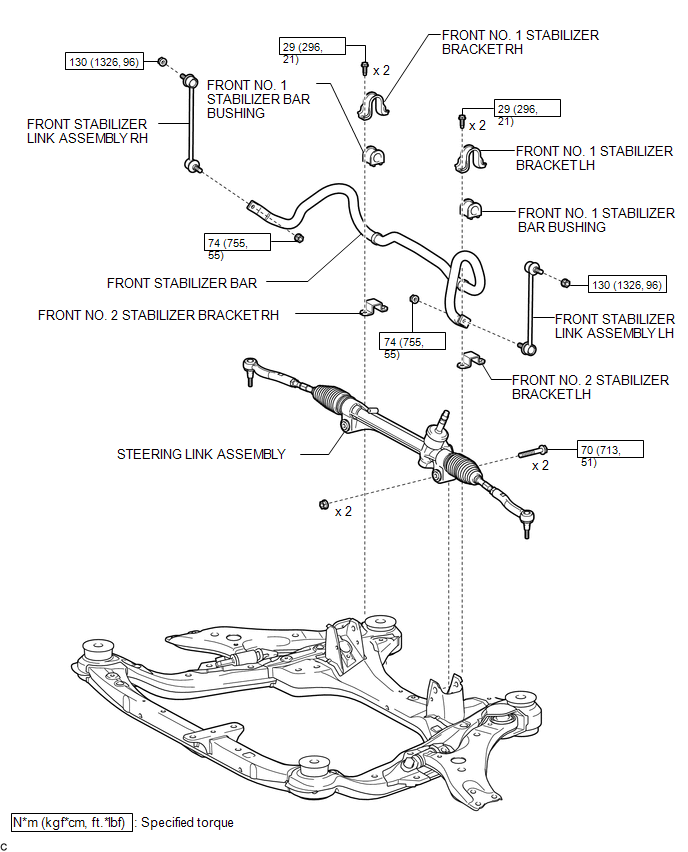

 Removal
REMOVAL
PROCEDURE
1. REMOVE FRONT WHEELS
2. REMOVE FRONT STABILIZER LINK ASSEMBLY LH
(a) Remove the 2 nuts and front stabilizer link assembly LH.
HINT:
If the ball joint turns tog ...
Other materials about Toyota Venza:
Steering Angle Sensor Initialization Incomplete (C1439/31,C1445/31)
DESCRIPTION
The skid control ECU acquires the steering angle sensor zero point every time
the ignition switch is turned to ON and the vehicle is driven at 50 km/h (31 mph)
or more for approximately 30 seconds. The ECU also stores previous zero points.
Wa ...
Receiver Error (C2176/76)
DESCRIPTION
The signals are transmitted to the tire pressure warning antenna and receiver
on the body as radio waves and then sent to the tire pressure warning ECU.
DTC No.
DTC Detection Condition
Trouble Area
...
Precaution
PRECAUTION
1. PRECAUTION FOR VEHICLE WITH SRS AIRBAG AND SEAT BELT PRETENSIONER
(a) Some operations in this section may affect the SRS airbags. Prior to performing
the corresponding operations, read the precautions regarding the SRS airbags (See
page ). ...

0.1324