
Toyota Venza: Charge Warning Light Comes ON while Driving
PROCEDURE
|
1. |
CHECK LOCK FUNCTION OF CLUTCH PULLEY |
(a) Check the lock function with the pulley installed in the vehicle.
(1) Visually check that the rotor in the generator operates with the engine started.
(b) Check the lock function with the pulley removed from the vehicle.
(1) Remove the generator pulley cap.
|
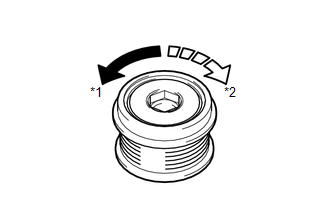
(2) Hold the generator rotor using SST, and turn the clutch pulley clockwise
to check that the outer ring locks (See page
Text in Illustration
OK: The outer ring locks. |
|
.gif) ).
).
SST: 09820-63021
| NG | .gif) |
REPLACE CLUTCH PULLEY |
|
.gif)
|
2. |
CHECK LOCK OF CLUTCH PULLEY |
(a) Start the engine and visually check for looseness of the clutch pulley.
OK:
The clutch pulley is not loose.
| OK | |
REPLACE GENERATOR ASSEMBLY |
| NG | |
TIGHTEN CLUTCH PULLEY TO THE SPECIFIED TORQUE |
 Problem Symptoms Table
PROBLEM SYMPTOMS TABLE
Use the table below to help determine the cause of problem symptoms.
If multiple suspected areas are listed, the potential causes of the symptoms
are listed in o ...
 Noise Occurs from Generator while Engine is Running
PROCEDURE
1.
CHECK LOOSENESS OF V-RIBBED BELT
(a) Check the tension of the belt by pushing it down with a finger.
OK:
The tension of the belt is enough.
NG ...
Other materials about Toyota Venza:
System Diagram
SYSTEM DIAGRAM
Communication Table
Transmitting ECU
Receiving ECU
Signal
Communication Method
Air Conditioning Control Assembly
Air Conditioning Amplifier Assembly
Rear windo ...
Inspection
INSPECTION
PROCEDURE
1. INSPECT COMPRESSOR WITH PULLEY (SOLENOID VALVE)
(a) Measure the resistance according to the value(s) in the table below.
Standard Resistance:
Tester Connection
Condition
...
Checking Monitor Status
CHECKING MONITOR STATUS
The purpose of the monitor result (mode 06) is to allow access to the results
of on-board diagnostic monitoring tests of specific components/systems that are
not continuously monitored. Examples are catalysts and evaporative emissi ...

0.1286