
Toyota Venza: Automatic door locking and unlocking systems
The following functions can be set or canceled:
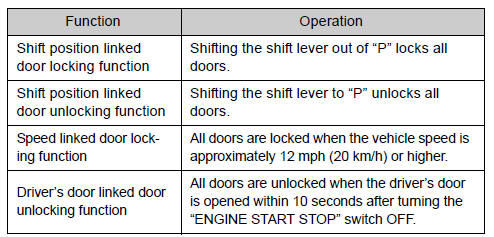
- Setting and canceling the functions
► Setting and canceling the functions Vehicles with TFT type multi-information display The function settings can be changed using the multi-information display.
► Vehicles with LCD type multi-information display To switch between setting and canceling, follow the procedure below:
 Vehicles with smart key system:
Close all the doors and switch the “ENGINE START STOP” switch to IGNITION ON
mode. (Perform  within 20 seconds.)
Vehicles without smart key system:
Close all the doors and switch the engine switch to the “ON” position. (Perform
within 20 seconds.)
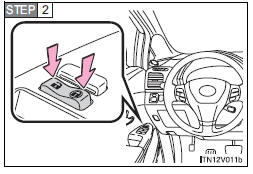
Shift the shift lever to “P” or “N”, press and hold the driver’s door lock switch
(  or
or
 ) for about 5 seconds then release.
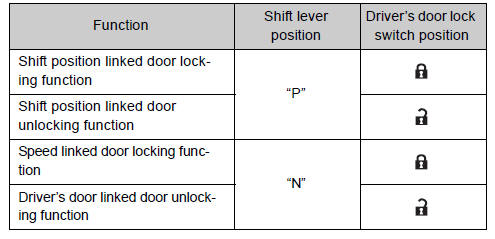
The shift lever and switch positions corresponding to the desired function to be set are shown as follows.
Use the same procedure to cancel the function.
When the setting or canceling operation is complete, all doors are locked and then unlocked.
- Impact detection door lock release system
In the event that the vehicle is subject to a strong impact, all the doors are unlocked.
Depending on the force of the impact or the type of accident, however, the system may not operate.
- Customization
Settings (e.g. unlocking function using a key) can be changed.
(Customizable features )
CAUTION
- To prevent an accident Observe the following precautions while driving the vehicle.
Failing to do so may result in a door opening and an occupant falling out, resulting in death or serious injury.
• Always use a seat belt.
• Always lock all doors.
• Ensure that all doors are properly closed.
• Do not pull the inside handle of the doors while driving.
The doors may be opened and the passengers are thrown out of the vehicle and it may result in death or serious injury.
Be especially careful for the front doors, as the doors may be opened even if the inside lock buttons are in locked position.
• Set the rear door child-protector locks when children are seated in the rear seat.
 Rear door child-protector lock
The door cannot be opened from inside the vehicle when the lock is set.
1. Unlock
2. Lock
These locks can be set to prevent children from opening the rear doors. Push
down on each rear door swi ...
 Back door
The back door can be opened using the back door opener. The back door can
be locked and unlocked using the entry function (vehicles with smart key system),
wireless remote control or door lock swi ...
Other materials about Toyota Venza:
Solar Sensor
Components
COMPONENTS
ILLUSTRATION
On-vehicle Inspection
ON-VEHICLE INSPECTION
PROCEDURE
1. INSPECT SOLAR SENSOR
(a) Disconnect the solar sensor connector.
(b) Measure the voltage accordin ...
Removal
REMOVAL
CAUTION / NOTICE / HINT
NOTICE:
Do not remove the steering angle sensor from the spiral cable.
HINT:
The steering angle sensor is a component of the spiral with sensor cable sub-assembly.
If the steering angle sensor malfunctions, replace the sp ...
System Description
SYSTEM DESCRIPTION
1. DESCRIPTION OF SYSTEM
(a) Each tire pressure warning valve and transmitter is equipped with a tire
pressure sensor and a transmitter and is installed in each tire and wheel assembly.
The sensor measures the tire pressure. The measur ...

0.1434