
Toyota Venza: Side doors
The vehicle can be locked and unlocked using the entry function, wireless remote control, key or door lock switch.
- Entry function (vehicles with smart key system)
- Wireless remote control
- Key
► Vehicles with smart key system The doors can also be locked and unlocked with the mechanical key.
► Vehicles without smart key system
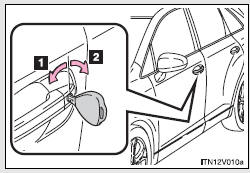
1. Locks all doors
2. Unlocks all doors
Turning the key unlocks the driver’s door. Turning the key again within 3 seconds unlocks the other doors.
- Door lock switch
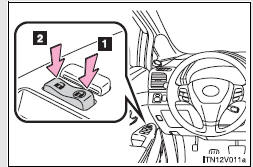
1. Locks all doors
2. Unlocks all doors
- Inside lock button
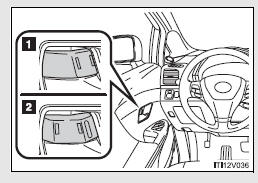
1. Locks the door
2. Unlocks the door
The front doors can be opened by pulling the inside handles even if the lock buttons are in the lock position.
- Locking the driver’s doors from the outside without a key
- Rear door child-protector lock
- Automatic door locking and unlocking systems
 Antenna location and effective range
- Antenna location
1. Antennas outside cabin
2. Antennas inside cabin
3. Antenna outside luggage compartment
- Effective range (areas within which the electronic key is detected)
...
 Locking the driver’s doors from the outside without a key
Move the inside lock button to the
lock position.
Close the door.
►Vehicles with smart key system
The door cannot be locked if the “ENGINE START STOP” switch is in ACCESSORY or IGNITI ...
Other materials about Toyota Venza:
Problem Symptoms Table
PROBLEM SYMPTOMS TABLE
Use the table below to help determine the cause of problem symptoms. If multiple
suspected areas are listed, the potential causes of the symptoms are listed in order
of probability in the "Suspected Area" column of the tab ...
Installation
INSTALLATION
PROCEDURE
1. INSTALL FRONT DOOR OUTSIDE HANDLE ASSEMBLY
(a) Insert the front end of the front door outside handle assembly into
the front door outside handle frame.
(b) Insert the r ...
Ignition Switch
Components
COMPONENTS
ILLUSTRATION
Removal
REMOVAL
PROCEDURE
1. REMOVE LOWER STEERING COLUMN COVER
2. REMOVE UPPER STEERING COLUMN COVER
3. REMOVE IGNITION SWITCH
(a) Remove the 2 screws and ignition switch.
...

0.1318