
Toyota Venza: Satellite Radio Antenna
Components
COMPONENTS
ILLUSTRATION
.png)
ILLUSTRATION
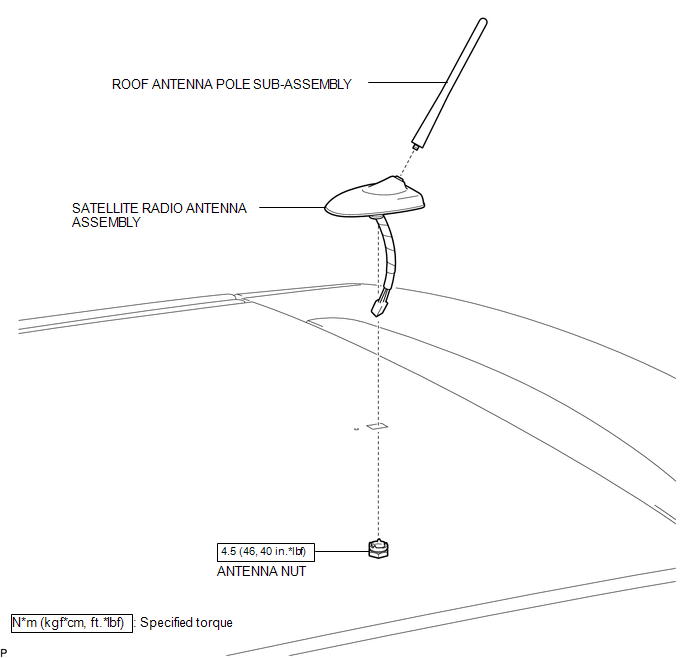
Removal
REMOVAL
PROCEDURE
1. REMOVE ROOF HEADLINING ASSEMBLY
(See page .gif) )
)
2. REMOVE ROOF ANTENNA POLE SUB-ASSEMBLY
3. REMOVE SATELLITE RADIO ANTENNA ASSEMBLY
|
(a) Disconnect the connector. |
|
.png)
|
(b) Remove the antenna nut. |
|
.png)
|
(c) Disengage the 2 claws and remove the satellite radio antenna assembly. |
|
.png)
Installation
INSTALLATION
PROCEDURE
1. INSTALL SATELLITE RADIO ANTENNA ASSEMBLY
(a) Engage the 2 claws to the vehicle body to temporarily install the satellite radio antenna assembly.
|
(b) Place the antenna cord in the cutout of the antenna nut. Text in Illustration
|
|
.png)
(c) Install the satellite radio antenna assembly with the antenna nut.
Torque:
4.5 N·m {46 kgf·cm, 40 in·lbf}
(d) Connect the connector.
2. INSTALL ROOF ANTENNA POLE SUB-ASSEMBLY
.gif)
3. INSTALL ROOF HEADLINING ASSEMBLY
(See page )
 Installation
INSTALLATION
PROCEDURE
1. INSTALL REAR NO. 2 SPEAKER ASSEMBLY (for 13 Speakers)
(a) Install the rear No. 2 speaker assembly with the 2 screws.
...

Other materials about Toyota Venza:
Blind Spot Mirrors
The Blind Spot Mirrors increase the view of surrounding area to assist the driver
when checking surrounding area before changing lanes.
1. Blind Spot Mirror field of view
2. Main mirror field of view
- Mirror angle can be adjusted when
►V ...
How To Proceed With Troubleshooting
CAUTION / NOTICE / HINT
HINT:
Use the following procedure to troubleshoot the power mirror control
system.
*: Use the Techstream.
PROCEDURE
1.
VEHICLE BROUGHT TO WORKSHOP
NEXT
...
Certification ECU Vehicle Information Reading/Writing Process Malfunction (B15F7)
DESCRIPTION
This DTC is stored when items controlled by the certification ECU (smart key
ECU assembly) cannot be customized via the audio and visual system vehicle customization
screen.
HINT:
The certification ECU (smart key ECU assembly) controls the s ...

0.1478