
Toyota Venza: Front Crankshaft Oil Seal
Components
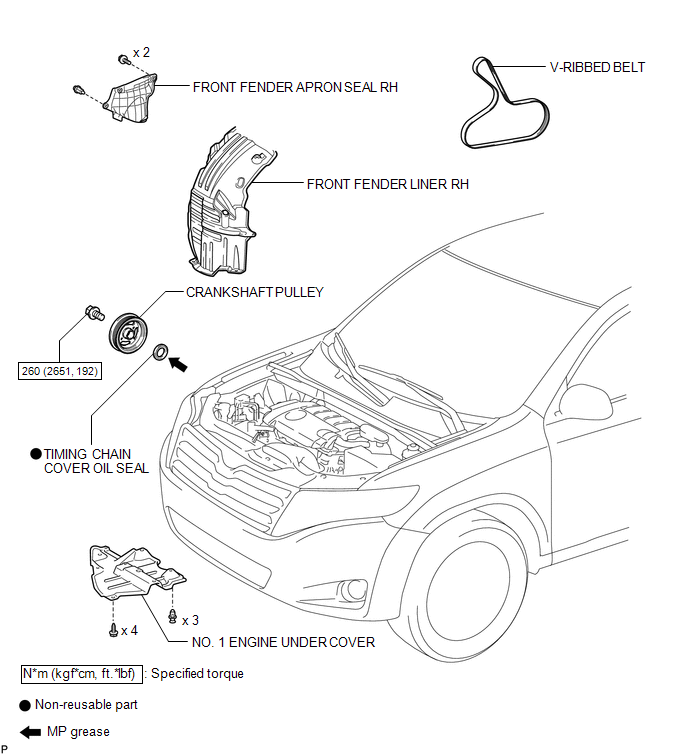
COMPONENTS
ILLUSTRATION
Removal
REMOVAL
PROCEDURE
1. REMOVE FRONT WHEEL RH
2. REMOVE NO. 1 ENGINE UNDER COVER
3. SEPARATE FRONT FENDER LINER RH
4. REMOVE FRONT FENDER APRON SEAL RH
.gif)
5. REMOVE V-RIBBED BELT
6. REMOVE CRANKSHAFT PULLEY
|
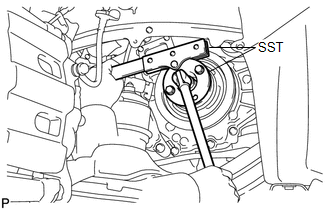
(a) Using SST, hold the crankshaft pulley and loosen the pulley bolt. Further loosen the bolt until 2 or 3 threads are screwed into the crankshaft. SST: 09213-54015 SST: 09330-00021 HINT: Part number of installation bolt for SST (crankshaft pulley holding tool): 91551-80650 (quantity: 2) |
|
|
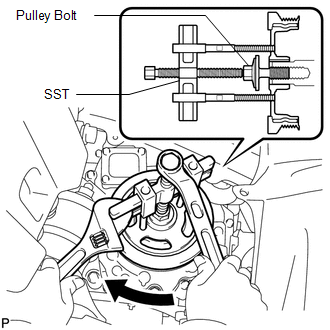
(b) Using SST and the pulley bolt, remove the crankshaft pulley. SST: 09950-50013 09951-05010 09952-05010 09953-05020 09954-05011 HINT: Apply a lubricant to the threads and end of SST. |
|
7. REMOVE TIMING CHAIN COVER OIL SEAL
|
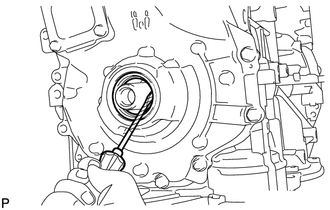
(a) Using a screwdriver, pry out the oil seal. HINT: Tape the screwdriver tip before use. NOTICE: Do not damage the surface of the oil seal press fit hole or the crankshaft. |
|
Installation
INSTALLATION
PROCEDURE
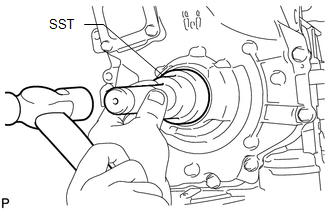
1. INSTALL TIMING CHAIN COVER OIL SEAL
(a) Apply MP grease to the lip of a new oil seal.
NOTICE:
- Do not allow foreign matter to contact the lip of the oil seal.
- Do not allow MP grease to contact the dust seal.
|
(b) Using SST and a hammer, tap in the oil seal until its surface is flush with the timing chain cover edge. SST: 09223-22010 NOTICE:
|
|
2. INSTALL CRANKSHAFT PULLEY
(a) Align the pulley set key with the key groove of the crankshaft pulley.
|
(b) Using SST, hold the crankshaft pulley and install the pulley bolt. SST: 09213-54015 SST: 09330-00021 Torque: 260 N·m {2651 kgf·cm, 192 ft·lbf} HINT: Part number of installation bolt for SST (crankshaft pulley holding tool): 91551-80650 (quantity: 2) |
|
.png)
3. INSTALL V-RIBBED BELT
.gif)
4. INSTALL FRONT FENDER APRON SEAL RH
5. INSTALL FRONT FENDER LINER RH
6. INSTALL NO. 1 ENGINE UNDER COVER
7. INSTALL FRONT WHEEL RH
Torque:
103 N·m {1050 kgf·cm, 76 ft·lbf}
 Reassembly
REASSEMBLY
PROCEDURE
1. INSTALL STIFFENING CRANKCASE RING PIN
NOTICE:
It is not necessary to remove the ring pin unless it is being replaced.
(a) Using a plastic-faced hammer, tap in 2 ...

Other materials about Toyota Venza:
Seat Position Airbag Sensor Circuit Malfunction (B1653/35)
DESCRIPTION
The seat position airbag sensor circuit consists of the center airbag sensor
assembly and seat position airbag sensor.
DTC B1653/35 is stored when a malfunction is detected in the seat position airbag
sensor circuit.
DTC No.
...
Disposal
DISPOSAL
PROCEDURE
1. DISPOSE OF REAR SHOCK ABSORBER
(a) Fully extend the shock absorber piston rod.
(b) Using a drill, make a hole in area B shown in the illustration to discharge
the gas inside. ...
Inner Rear View Mirror Power Source Circuit
DESCRIPTION
This circuit detects the state of the ignition switch, and sends it to the inner
rear view mirror assembly.
WIRING DIAGRAM
CAUTION / NOTICE / HINT
NOTICE:
Inspect the fuses for circuits related to this system before performing the followin ...

0.1362