
Toyota Venza: System Diagram
SYSTEM DIAGRAM
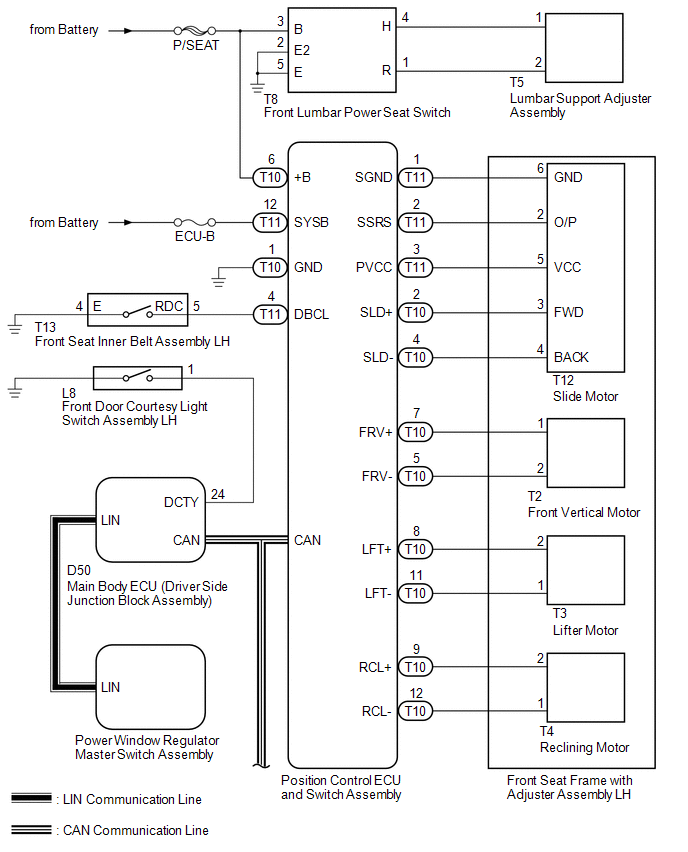
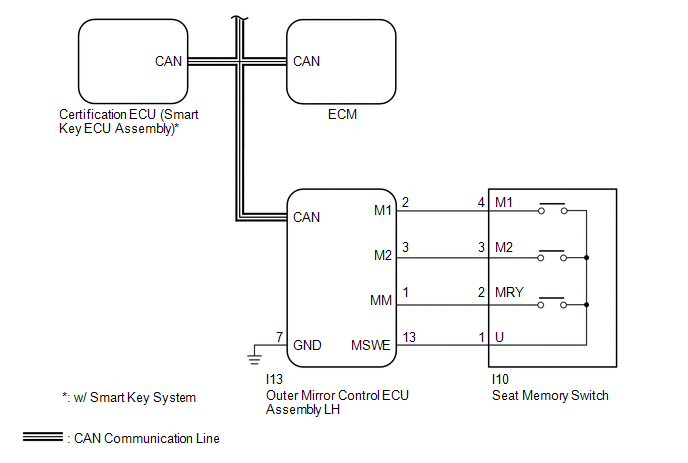 Communication Table
|
Sender |
Receiver |
Signal |
Line |
|---|---|---|---|
|
ECM |
Main Body ECU (Driver Side Junction Block Assembly) |
|
CAN |
|
Outer Mirror Control ECU Assembly LH |
Main Body ECU (Driver Side Junction Block Assembly) |
|
CAN |
|
Main Body ECU (Driver Side Junction Block Assembly) |
Position Control ECU and Switch Assembly |
|
CAN |
|
Certification ECU (Smart Key ECU Assembly)* |
Main Body ECU (Driver Side Junction Block Assembly) |
|
CAN |
|
Position Control ECU and Switch Assembly |
Main Body ECU (Driver Side Junction Block Assembly) |
|
CAN |
- *: w/ Smart Key System
 System Description
SYSTEM DESCRIPTION
1. FRONT POWER SEAT CONTROL SYSTEM DESCRIPTION
The driver seat is equipped with slide, reclining, lifter, front vertical,
and lumbar support adjustment functions.
T ...
 How To Proceed With Troubleshooting
CAUTION / NOTICE / HINT
HINT:
Use the following procedure to troubleshoot the front power seat control
system (w/ Memory).
*: Use the Techstream.
PROCEDURE
1.
...
Other materials about Toyota Venza:
Components
COMPONENTS
ILLUSTRATION
ILLUSTRATION
ILLUSTRATION
ILLUSTRATION
ILLUSTRATION
ILLUSTRATION
ILLUSTRATION
ILLUSTRATION
ILLUSTRATION
ILLUSTRATION
ILLUSTRATION
ILLUSTRATION
...
Rear Height Control Sensor (B241A)
DESCRIPTION
The headlight leveling ECU assembly receives signals indicating the height of
the vehicle from the rear height control sensor sub-assembly RH.
DTC No.
DTC Detecting Condition
Trouble Area
B241A
...
System Description
SYSTEM DESCRIPTION
1. SEAT BELT WARNING SYSTEM DESCRIPTION
If a seat belt is not fastened, this system flashes the seat belt warning light
or sounds the seat belt warning buzzer as a reminder.
(a) Driver side seat belt warning light:
When the driver side ...

0.1369