
Toyota Venza: Smart key system
The following operations can be performed simply by carrying the electronic key on your person, for example in your pocket.
(The driver should always carry the electronic key.)
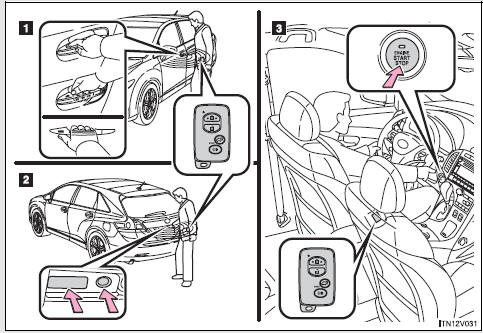
1. Locks and unlocks the doors 2. Locks and unlocks the doors 3. Starts and stops the engine

 Unlocking and locking the doors
►Front door handle
Grip the driver’s door handle to unlock the door. Grip the passenger’s door handle
to unlock all the doors.* Make sure to touch the sensor on the back of the handle.
...
Other materials about Toyota Venza:
Steering Angle Sensor Communication Stop Mode
DESCRIPTION
Detection Item
Symptom
Trouble Area
Steering Angle Sensor Communication Stop Mode
"Steering Angle Sensor" is not displayed on "CAN Bus Check"
screen ...
Entire Combination Meter does not Operate
DESCRIPTION
This circuit is the power source circuit for the meter. This circuit provides
two types of power sources; one is a constant power source mainly used as a backup
power source, and the other is an IG power source mainly used for signal transmiss ...
Removal
REMOVAL
PROCEDURE
1. DISCONNECT FRONT DOOR OPENING TRIM WEATHERSTRIP
2. REMOVE FRONT PILLAR GARNISH
3. REMOVE NO. 2 INSTRUMENT PANEL SPEAKER PANEL SUB-ASSEMBLY
4. REMOVE FRONT NO. 4 SPEAKER ASSEMBLY (for 13 Speakers)
(a) Remove the 2 ...

0.159