
Toyota Venza: Seat heaters
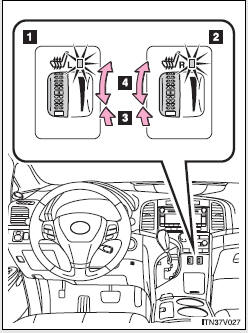
1. For driver’s seat
2. For front passenger’s seat
3. On
The indicator light comes on.
4. Adjusts the seat temperature
The further you turn the dial upward, the warmer the seat becomes.
- The seat heaters can be used when
►Vehicles with smart key system The “ENGINE START STOP” switch is in IGNITION ON mode.
►Vehicles without smart key system The engine switch is in the “ON” position.
CAUTION
- Burns
• Use caution when seating the following persons in a seat with the seat heater on
to avoid the possibility of burns:
• Babies, small children, the elderly, the sick and the disabled • Persons with sensitive skin • Persons who are fatigued • Persons who have taken alcohol or drugs that induce sleep (sleeping drugs, cold remedies, etc.)
• Do not cover the seat with anything when using the seat heater.
Using the seat heater with a blanket or cushion increases the temperature of the seat and may lead to overheating.
NOTICE
- To prevent seat heater damage
Do not put unevenly weighted objects on the seat and do not stick sharp objects (needles, nails, etc.) into the seat.
- To prevent battery discharge
Turn the switches off when the engine is not running.
 Power outlets
The power outlets can be used for 12V accessories that run on less than 10A.
►Console box
►Front passenger’s side instrument panel
►Luggage compartment
- The power ...
 Armrest
►Front
Lift the lever up and slide the armrest.
► Rear
Pull the armrest down for use.
NOTICE
- To prevent damage to the armrest
Do not place too much strain on the armrest. ...
Other materials about Toyota Venza:
Main Body ECU Vehicle Information Reading/Writing Process Malfunction (B15F6)
DESCRIPTION
This DTC is stored when items controlled by the main body ECU (multiplex network
body ECU) cannot be customized via the audio and visual system vehicle customization
screen.
HINT:
The main body ECU (multiplex network body ECU) controls t ...
Rear Height Control Sensor (B241A)
DESCRIPTION
The headlight leveling ECU assembly receives signals indicating the height of
the vehicle from the rear height control sensor sub-assembly RH.
DTC No.
DTC Detecting Condition
Trouble Area
B241A
...
Indicator Circuit
DESCRIPTION
The headlight beam level control system indicator light in the combination meter
assembly comes on for approximately 3 seconds when the ignition switch is turned
to ON. The indicator light also comes on when the headlight leveling ECU assembly ...

0.1569