
Toyota Venza: Removal
REMOVAL
PROCEDURE
1. REMOVE REAR BUMPER ASSEMBLY
(See page .gif) )
)
2. REMOVE ULTRASONIC SENSOR CLIP
|
(a) Disconnect the connector. Text in Illustration
|
|
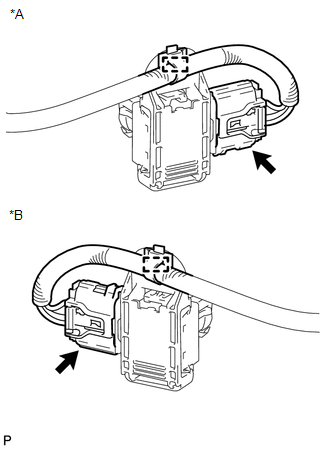
(b) Disengage the clamp.
|
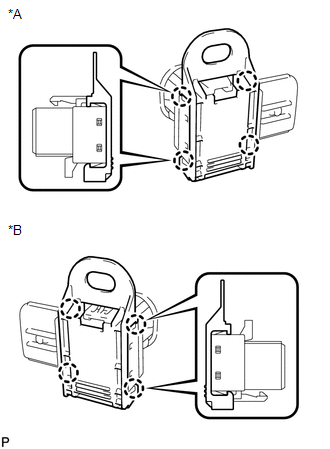
(c) Disengage the 4 claws to remove the ultrasonic sensor clip. Text in Illustration
|
|
3. REMOVE NO. 1 ULTRASONIC SENSOR
|
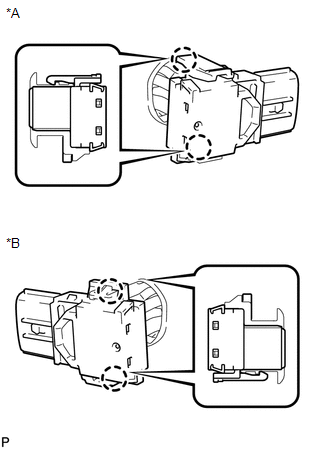
(a) Disengage the 2 claws to remove the No. 1 ultrasonic sensor. Text in Illustration
|
|
4. REMOVE NO. 1 ULTRASONIC SENSOR RETAINER
|
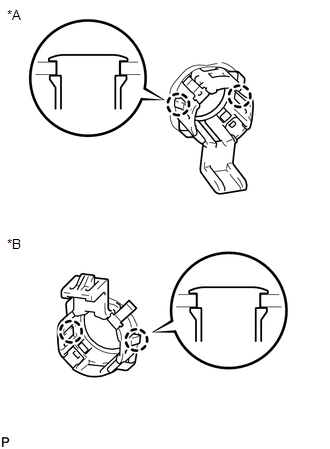
(a) Disengage the 2 claws to remove the No. 1 ultrasonic sensor retainer from the rear bumper assembly. Text in Illustration
|
|
 Inspection
INSPECTION
PROCEDURE
1. INSPECT NO. 1 ULTRASONIC SENSOR
(a) Measure the resistance according to the value(s) in the table below.
Standard Resistance:
Tester Conne ...
 Installation
INSTALLATION
PROCEDURE
1. INSTALL NO. 1 ULTRASONIC SENSOR RETAINER
(a) Engage the 2 claws to install the No. 1 ultrasonic sensor retainer
to the rear bumper assembly.
Text in Illu ...
Other materials about Toyota Venza:
Fail-safe Chart
FAIL-SAFE CHART
1. FAIL-SAFE FUNCTION
(a) When communication fails in any of the CAN bus wires (communication wires),
a fail-safe function(s) will operate. The fail-safe function that is specified for
each system operates to prevent those systems from ma ...
Steering wheel
The steering wheel can be adjusted to a comfortable position.
Hold the steering wheel and press the lever down.
Adjust to the ideal position by moving the steering wheel horizontally and vertically.
After adjustment, pull the lever up to secure the stee ...
Removal
REMOVAL
PROCEDURE
1. REMOVE REAR DOOR SCUFF PLATE RH
HINT:
Use the same procedure for the RH side and LH side (See page
).
2. DISCONNECT REAR DOOR OPENING TRIM WEATHERSTRIP RH
HINT:
Use the same procedure for the RH side and LH side (See page
).
3. ...

0.1421