
Toyota Venza: On-vehicle Inspection
ON-VEHICLE INSPECTION
PROCEDURE
1. INSPECT GARAGE DOOR OPENER
|
(a) To inspect the garage door opener system, press each switch and check that the LED in the "HomeLink" logo illuminates as illustrated. If one or more of the switches do not cause the LED to illuminate, confirm that the fuse and the wiring to the garage door opener system unit is normal. If the fuse and wiring are normal, and the LED does not illuminate, replace the garage door opener system unit located in the roof console box assembly. |
|
.png)
2. INSPECT GARAGE DOOR OPENER REGISTRATION AND TRANSMITTING
HINT:
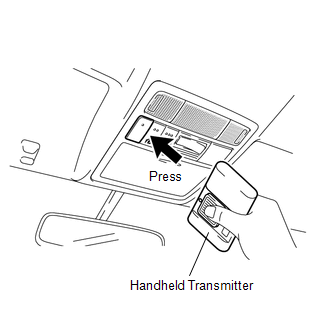
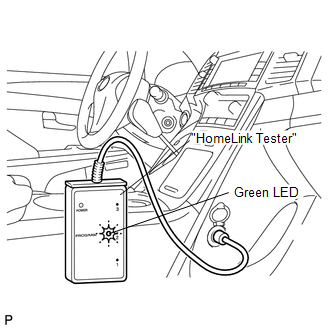
Use the KENT-MOORE "HomeLink" tester, and the KENT-MOORE handheld transmitter for this test. First clear the customer's transmitter codes, and then register the code of the KENT-MOORE handheld transmitter to the garage door opener system.
|
(a) Check if the code of the KENT-MOORE handheld transmitter was successfully registered. HINT: If the code of the KENT-MOORE handheld transmitter cannot be registered, replace the garage door opener system unit. |
|
.png)
(b) Press the garage door opener switch that was used to copy the signal from the handheld transmitter. Check if the green LED of the "HomeLink" tester illuminates.
HINT:
If the green LED does not illuminate, replace the garage door opener system unit that is located in the roof console box assembly.
(c) When the inspection is complete, re-register the customer's handheld transmitter codes.
 System Description
SYSTEM DESCRIPTION
1. DESCRIPTION
(a) A maximum of 3 codes for transmitter-code based systems such as garage doors
gates and entry gates can be registered to the vehicle garage door opener system. ...

Other materials about Toyota Venza:
Ignition Switch
Components
COMPONENTS
ILLUSTRATION
Removal
REMOVAL
PROCEDURE
1. REMOVE LOWER STEERING COLUMN COVER
2. REMOVE UPPER STEERING COLUMN COVER
3. REMOVE IGNITION SWITCH
(a) Remove the 2 screws and ignition switch.
...
Malfunction in Deceleration Sensor (C0365/28,C1234/34,C1245/32,C1245/45)
DESCRIPTION
The skid control ECU receives signals from the yaw rate and acceleration sensor
via the CAN communication system.
The yaw rate sensor has a built-in acceleration sensor.
If there is trouble in the bus lines between the yaw rate and acceleratio ...
Evaporative Emission System Leak Detection Reference Orifice Low Flow (P043E,P043F,P2401,P2402,P2419)
DTC SUMMARY
DTC No.
Monitoring Item
Malfunction Detection Condition
Trouble Area
Detection Timing
Detection Logic
P043E
Reference orifice clogged
P043E, P ...

0.1303