
Toyota Venza: Installation
INSTALLATION
PROCEDURE
1. INSTALL FRONT SHOULDER BELT ANCHOR ADJUSTER ASSEMBLY
|
(a) Engage the adjuster positioning hole with the guide and install the front shoulder belt anchor adjuster assembly with the 2 bolts. Torque: 42 N·m {428 kgf·cm, 31 ft·lbf} |
|
.png)
2. INSTALL FRONT SEAT OUTER BELT ASSEMBLY
|
(a) Engage the 2 guides. |
|
.png)
(b) Install the front seat outer belt assembly with the bolt.
Torque:
7.5 N·m {77 kgf·cm, 66 in·lbf}
|
(c) Connect the connector and lock the locking button as shown in the illustration. NOTICE: Securely lock the locking button. |
|
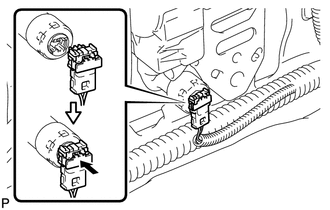
|
(d) Connect the shoulder anchor of the front seat outer belt assembly with the nut. Torque: 42 N·m {428 kgf·cm, 31 ft·lbf} |
|
.png)
3. INSTALL UPPER CENTER PILLAR GARNISH
.gif)
4. INSTALL LOWER CENTER PILLAR GARNISH
5. CONNECT FRONT SEAT OUTER BELT ASSEMBLY
|
(a) Install the floor end of the front seat outer belt assembly with the bolt. Torque: 42 N·m {428 kgf·cm, 31 ft·lbf} |
|
.png)
(b) Check if the ELR locks.
NOTICE:
The check should be performed with the outer belt assembly installed.
(1) With the belt assembly installed, check that the belt locks when it is pulled out quickly.
6. INSTALL LAP BELT OUTER ANCHOR COVER
|
(a) Engage the 3 claws to install the lap belt outer anchor cover. |
|
.png)
7. CONNECT REAR DOOR OPENING TRIM WEATHERSTRIP
|
(a) Connect the rear door opening trim weatherstrip. |
|
.png)
8. INSTALL REAR DOOR SCUFF PLATE
9. CONNECT FRONT DOOR OPENING TRIM WEATHERSTRIP
|
(a) Connect the front door opening trim weatherstrip. |
|
.png)
10. INSTALL FRONT DOOR SCUFF PLATE
11. CONNECT CABLE TO NEGATIVE BATTERY TERMINAL
NOTICE:
When disconnecting the cable, some systems need to be initialized after the cable
is reconnected (See page ).
12. INSPECT SRS WARNING LIGHT
(a) Inspect the SRS warning light (See page
).
 Inspection
INSPECTION
PROCEDURE
1. INSPECT FRONT SEAT OUTER BELT ASSEMBLY
NOTICE:
Do not disassemble the retractor.
(a) Before installing the front seat outer belt assembly, check the ELR.
(1) When the i ...
 Disposal
DISPOSAL
CAUTION / NOTICE / HINT
CAUTION:
Before performing pre-disposal deployment of any SRS component, review and closely
follow all applicable environmental and hazardous material regulations ...
Other materials about Toyota Venza:
Removal
REMOVAL
CAUTION / NOTICE / HINT
HINT:
Use the same procedure for the RH side and LH side.
The procedure listed below is for the LH side.
PROCEDURE
1. PRECAUTION
HINT:
See page
2. DRAIN AUTOMATIC TRANSAXLE FLUID
HINT:
for U ...
Terminals Of Ecu
TERMINALS OF ECU
1. CHECK POWER BACK DOOR ECU (POWER BACK DOOR MOTOR UNIT)
(a) Disconnect the L20 ECU connector.
(b) Measure the voltage and resistance according to the value(s) in the table
below.
Tester Connection
Wiring Color
...
Rear window defogger
Clear the rear window using the defogger.
On/off
The defogger will automatically turn off after 15 or 60 minutes.
This operation time changes according to the ambient temperature and vehicle
speed.
Pressing the switch again also turns the defogger off. ...

0.1139