
Toyota Venza: Installation
INSTALLATION
PROCEDURE
1. INSTALL REAR SEAT ASSEMBLY RH
(a) Place the rear seat assembly RH in the cabin.
NOTICE:
Be careful not to damage the vehicle body.
|
(b) Temporarily install the 2 bolts on the front side of the seat. |
|
.png)
|
(c) Temporarily install the 3 bolts on the rear side of the seat. |
|
.png)
(d) Install the rear seat assembly RH with the 5 bolts.
Torque:
37 N·m {377 kgf·cm, 27 ft·lbf}
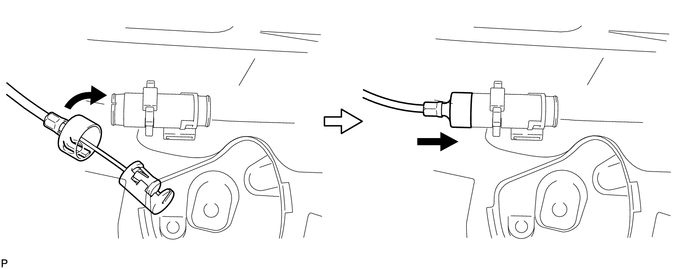
2. CONNECT REAR SEAT RECLINING CONTROL CABLE SUB-ASSEMBLY
(a) Connect the rear seat reclining control cable as shown in the illustration.
(b) Connect the rear seat reclining control cable sub-assembly as shown in the illustration.
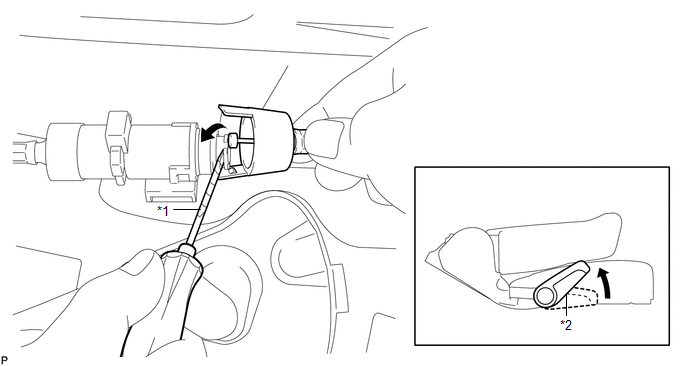 Text in Illustration
|
*1 |
Protective Tape |
*2 |
Seat Track Adjusting Handle |
|
(c) Engage the 2 claws and connect the rear seat reclining control cable sub-assembly as shown in the illustration. |
|
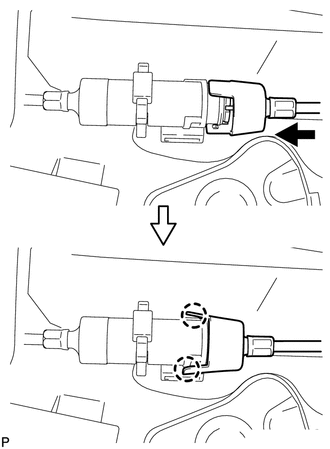
(d) Return the seatback to the upright position.
(e) Pull up the adjuster's lock piece to lock it as shown in the illustration.
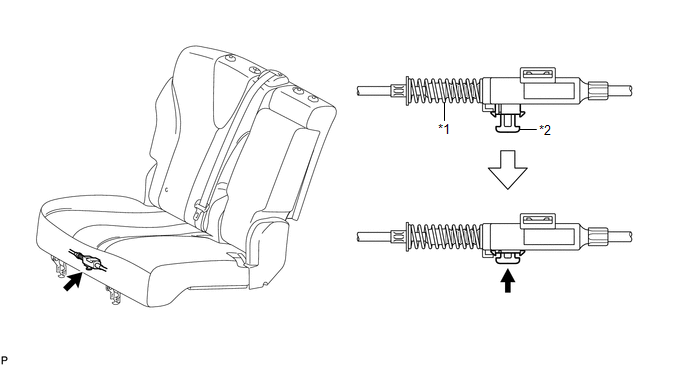 Text in Illustration
|
*1 |
Adjuster Spring |
*2 |
Lock Piece |
NOTICE:
When pressing the lock piece, make sure the adjuster's spring is not compressed.
3. INSTALL REAR SEAT OUTER TRACK BRACKET COVER
|
(a) Engage the 3 claws and guide, and install the rear seat outer track bracket cover as shown in the illustration. |
|
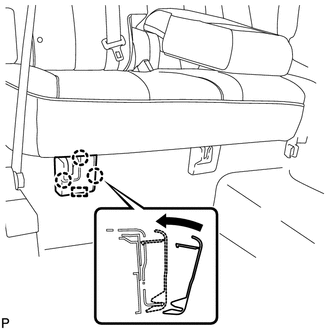
4. INSTALL REAR SEAT INNER TRACK BRACKET COVER
|
(a) Engage the 3 claws and guide, and install the rear seat inner track bracket cover as shown in the illustration. |
|
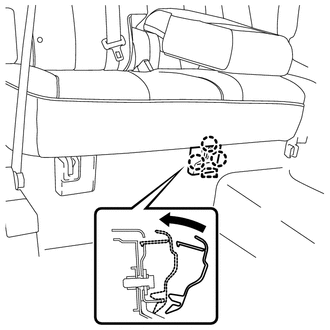
5. INSTALL REAR SEAT CENTER HEADREST ASSEMBLY
|
(a) Install the rear seat center headrest assembly as shown in the illustration. |
|
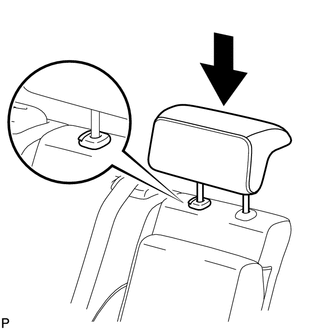
6. INSTALL REAR SEAT HEADREST ASSEMBLY
|
(a) Install the rear seat headrest assembly as shown in the illustration. |
|
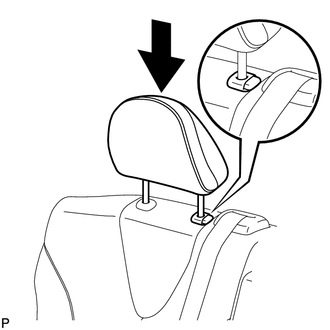
 Reassembly
REASSEMBLY
PROCEDURE
1. INSTALL REAR SEAT LEG ASSEMBLY RH
(a) Using a T55 "TORX" socket wrench, install the rear seat leg assembly
RH with the 5 "TORX" bolts.
...
 Seat Heater Control
Components
COMPONENTS
ILLUSTRATION
Installation
INSTALLATION
PROCEDURE
1. INSTALL SEAT HEATER CONTROL SUB-ASSEMBLY
(a) Engage the clamp and install the seat heater control sub- ...
Other materials about Toyota Venza:
Mechanical System Tests
MECHANICAL SYSTEM TESTS
1. STALL SPEED TEST
HINT:
This test is to check the overall performance of the engine and transaxle.
CAUTION:
Driving test should be done on a paved surface (a surface that is not
slippery).
To ensure safety, perfor ...
Terminals Of Ecu
TERMINALS OF ECU
1. CHECK AIR CONDITIONING AMPLIFIER ASSEMBLY
(a) Disconnect the D47 air conditioning amplifier assembly connector.
(b) Measure the voltage and resistance according to the value(s) in the table
below.
HINT:
Measure the values on the wi ...
Intuitive parking assist
The distance from your vehicle to nearby obstacles when parallel parking or
maneuvering into a garage is measured by the sensors and communicated via the multi-information
display and a buzzer.
Always check the surrounding area when using this system.
&n ...

0.1716