
Toyota Venza: Installation
INSTALLATION
PROCEDURE
1. INSTALL REAR COMBINATION LIGHT ASSEMBLY
|
(a) Engage the guide and 2 pins, and install the rear combination light assembly as shown in the illustration. Text in Illustration
|
|
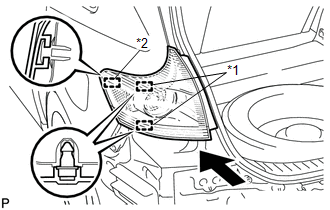
|
(b) Install the rear combination light assembly with the 2 nuts. Torque: 6.8 N·m {69 kgf·cm, 60 in·lbf} |
|
.png)
(c) Engage the clamp.
(d) Connect the connector.
2. INSTALL REAR BUMPER ASSEMBLY
.gif)
3. INSTALL REAR BUMPER PLATE LH
4. INSTALL REAR BUMPER PLATE RH
5. INSTALL DECK TRIM SIDE PANEL ASSEMBLY LH (for LH Side)
6. INSTALL DECK TRIM SIDE PANEL ASSEMBLY RH (for RH Side)
7. CONNECT REAR SEAT OUTER BELT ASSEMBLY
8. INSTALL LUGGAGE HOLD BELT STRIKER ASSEMBLY
9. INSTALL RECLINING REMOTE CONTROL BEZEL
10. INSTALL REAR SEAT ASSEMBLY LH (for LH Side)
11. CONNECT REAR SEAT NO. 2 RECLINING CONTROL CABLE SUB-ASSEMBLY (for LH Side)
12. INSTALL REAR SEAT OUTER TRACK BRACKET COVER (for LH Side)
13. INSTALL REAR SEAT INNER TRACK BRACKET COVER (for LH Side)
14. INSTALL REAR SEAT HEADREST ASSEMBLY (for LH Side)
15. INSTALL REAR SEAT ASSEMBLY RH (for RH Side)
16. CONNECT REAR SEAT RECLINING CONTROL CABLE SUB-ASSEMBLY (for RH Side)
17. INSTALL REAR SEAT OUTER TRACK BRACKET COVER (for RH Side)
18. INSTALL REAR SEAT INNER TRACK BRACKET COVER (for RH Side)
19. INSTALL REAR SEAT CENTER HEADREST ASSEMBLY (for RH Side)
20. INSTALL REAR SEAT HEADREST ASSEMBLY (for RH Side)
21. INSTALL REAR FLOOR FINISH PLATE
22. INSTALL REAR SEAT SUB FLOOR PANEL ASSEMBLY
23. INSTALL NO. 1 DECK BOARD
24. INSTALL DECK SIDE TRIM BOX LH
25. INSTALL NO. 3 DECK BOARD SUB-ASSEMBLY
26. INSTALL DECK SIDE TRIM BOX RH
27. INSTALL NO. 2 DECK BOARD SUB-ASSEMBLY
28. INSTALL DECK BOARD ASSEMBLY
29. INSTALL TONNEAU COVER ASSEMBLY (w/ Tonneau Cover)
30. CONNECT REAR DOOR OPENING TRIM WEATHERSTRIP
31. INSTALL REAR DOOR SCUFF PLATE
 Reassembly
REASSEMBLY
PROCEDURE
1. INSTALL REAR BUMPER UPPER RETAINER
(a) Engage the guide.
(b) Install the rear bumper upper retainer with the 2 scr ...
 Rear Light Assembly
Components
COMPONENTS
ILLUSTRATION
On-vehicle Inspection
ON-VEHICLE INSPECTION
PROCEDURE
1. INSPECT REAR LIGHT ASSEMBLY
(a) Disconnect the connector from the rear light assembl ...
Other materials about Toyota Venza:
Air Conditioning Compressor Magnetic Clutch Circuit
DESCRIPTION
When the A/C amplifier is turned on, a magnetic clutch ON signal is sent from
the MGC terminal of the A/C amplifier. Then, the MGC relay turns on to operate the
magnetic clutch.
WIRING DIAGRAM
CAUTION / NOTICE / HINT
NOTICE:
Inspect the ...
Lost Communication with Front Satellite Sensor Bus (B161A/8A)
DESCRIPTION
The front collision sensor circuit (front airbag sensor RH circuit and front
airbag sensor LH circuit) is composed of the center airbag sensor assembly, front
airbag sensor RH and front airbag sensor LH.
The front airbag sensor RH or front ai ...
Portable Player cannot be Operated Using In-vehicle Device or Track Information
is not Displayed on In-vehicle Device
PROCEDURE
1.
CHECK USING ANOTHER "Bluetooth" AUDIO COMPATIBLE VEHICLE OF SAME MODEL
(a) Check if track information is displayed normally on another "Bluetooth" audio
compatible vehicle of the same model.
...

0.1611