
Toyota Venza: Headlight Dimmer Switch
Components
COMPONENTS
ILLUSTRATION
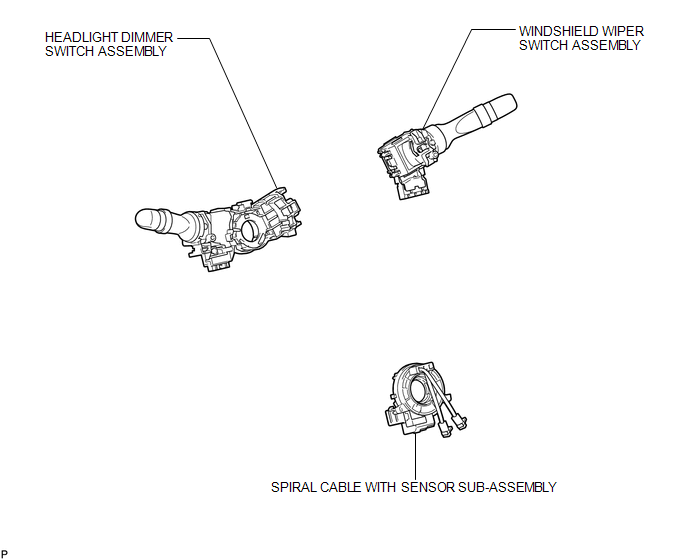
Removal
REMOVAL
PROCEDURE
1. REMOVE SPIRAL CABLE WITH SENSOR SUB-ASSEMBLY
(See page .gif) )
)
2. REMOVE WINDSHIELD WIPER SWITCH ASSEMBLY
3. REMOVE HEADLIGHT DIMMER SWITCH ASSEMBLY
|
(a) Disconnect the connector. |
|
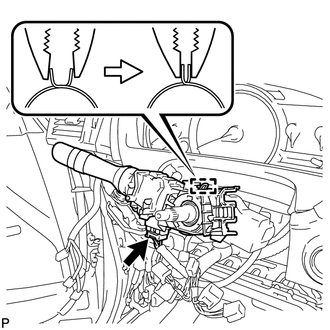
(b) Disengage the clamp as shown in the illustration.
|
(c) Disengage the claw and remove the headlight dimmer switch assembly as shown in the illustration. |
|
Inspection
INSPECTION
PROCEDURE
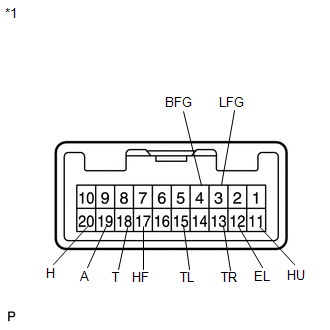
1. INSPECT HEADLIGHT DIMMER SWITCH ASSEMBLY
|
(a) Measure the resistance according to the value(s) in the table below. Standard Resistance: Light Control Switch
If the result is not as specified, replace the headlight dimmer switch assembly. |
|
Installation
INSTALLATION
PROCEDURE
1. INSTALL HEADLIGHT DIMMER SWITCH ASSEMBLY
|
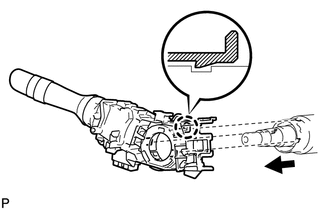
(a) Install the headlight dimmer switch assembly as shown in the illustration. |
|
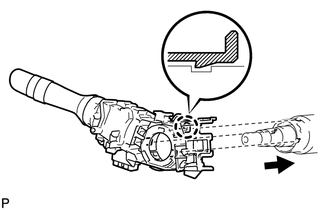
(b) Engage the claw.
|
(c) Install the headlight dimmer switch assembly with the clamp. |
|
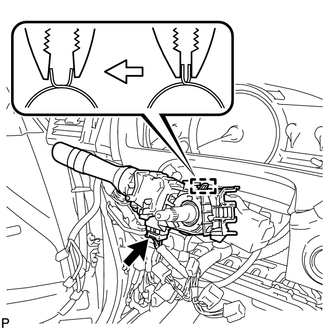
(d) Connect the connector.
2. INSTALL WINDSHIELD WIPER SWITCH ASSEMBLY
.gif)
3. INSTALL SPIRAL CABLE WITH SENSOR SUB-ASSEMBLY
(See page )
 Installation
INSTALLATION
PROCEDURE
1. INSTALL HEADLIGHT ASSEMBLY
(a) Connect each connector.
(b) Install the headlight assembly with the bolt and 3 screws.
Torque:
3.6 N·m {37 kgf·cm, 32 in·lbf}
2. INS ...
 Headlight Leveling Ecu
Components
COMPONENTS
ILLUSTRATION
Removal
REMOVAL
PROCEDURE
1. REMOVE HEADLIGHT LEVELING ECU ASSEMBLY
(a) Disconnect the connector.
...
Other materials about Toyota Venza:
Initialization has not been Performed (B2450)
DESCRIPTION
The headlight leveling ECU assembly stores this DTC if initialization has not
been performed after the ECU was replaced.
DTC No.
DTC Detecting Condition
Trouble Area
B2450
Initializat ...
Rear Power Window RH Auto Up / Down Function does not Operate with Rear Power
Window Switch RH
DESCRIPTION
If the manual up/down function can be performed but the auto up/down function
cannot, the fail-safe mode may be functioning.
If the power window initialization (See page
) has not been performed, the auto up/down function
will not operate.
...
Terminals Of Ecu
TERMINALS OF ECU
1. TERMINALS OF ECU
Text in Illustration
*1
Component without harness connected
(Brake Actuator (Skid Control ECU))
Terminal No. (Symbol)
Terminal Description
1 (GND ...

0.1856