
Toyota Venza: Components
COMPONENTS
ILLUSTRATION
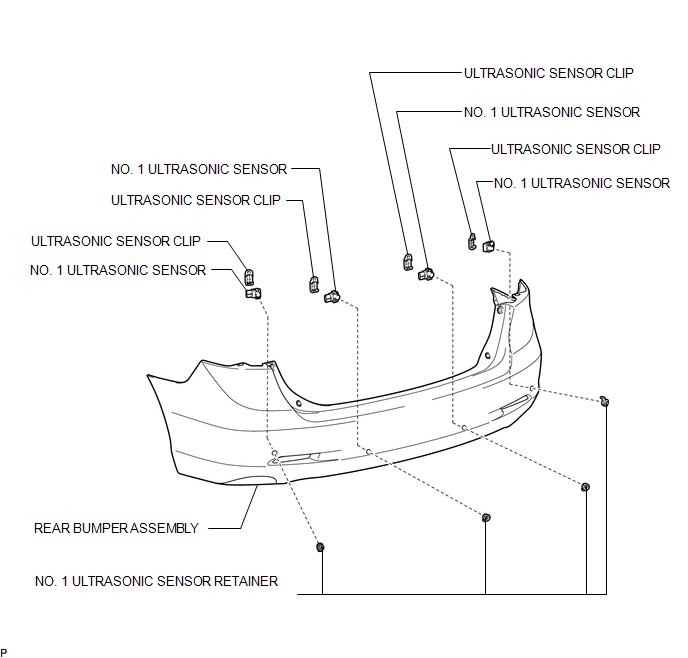

 Inspection
INSPECTION
PROCEDURE
1. INSPECT NO. 1 ULTRASONIC SENSOR
(a) Measure the resistance according to the value(s) in the table below.
Standard Resistance:
Tester Conne ...
Other materials about Toyota Venza:
Air Conditioning Control Panel Circuit
DESCRIPTION
This circuit consists of the air conditioning control assembly and the A/C amplifier.
When the air conditioning control assembly is operated, signals are transmitted
to the A/C amplifier through the LIN communication system.
If the LIN commun ...
Diagnostic Trouble Code Chart
DIAGNOSTIC TROUBLE CODE CHART
Main Body ECU (Driver Side junction Block Assembly)
DTC Code
Detection Item
Trouble Area
See page
B1206
P/W Master Switch Communication Stop
1. M ...
Detecting Vehicle Submersion (B2277)
DESCRIPTION
This DTC is stored when the submersion circuit monitor inside the power management
control ECU detects a large amount of water.
DTC No.
DTC Detection Condition
Trouble Area
B2277
The ...

0.1421