
Toyota Venza: Components
COMPONENTS
ILLUSTRATION
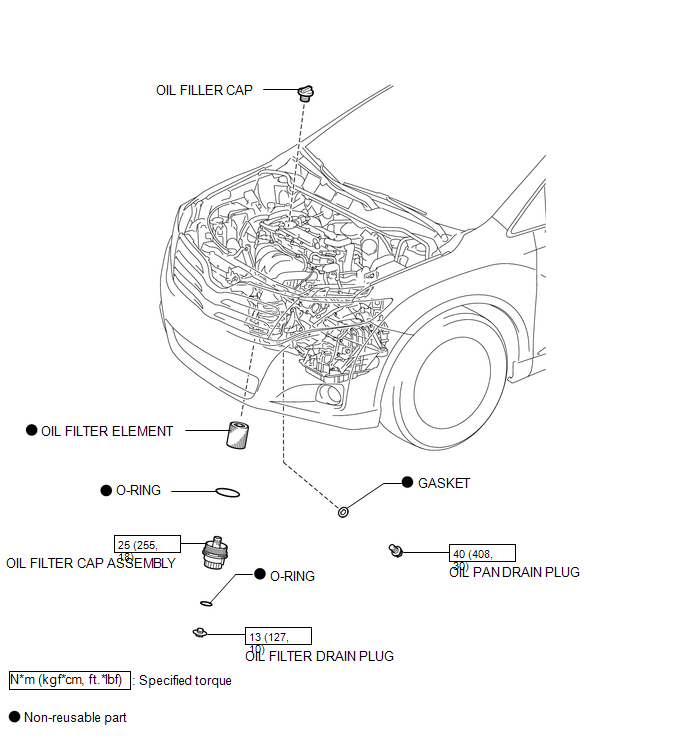

 Replacement
REPLACEMENT
CAUTION / NOTICE / HINT
CAUTION:
Prolonged and repeated contact with engine oil will result in the removal
of natural oils from the skin, leading to dryness, irritation and ...
Other materials about Toyota Venza:
Terminals Of Ecu
TERMINALS OF ECU
1. REAR TELEVISION CAMERA ASSEMBLY
(a) Disconnect the R21 rear television camera assembly connector.
(b) Measure the voltage on the wire harness side connector according to the value(s)
in the table below.
Terminal No. (Symb ...
Operation Check
OPERATION CHECK
1. CHECK POWER SEAT FUNCTION
(a) Check the basic functions.
Text in Illustration
*1
Slide Function
*2
Front Vertical Function
*3
Lifter Function
...
Installation
INSTALLATION
PROCEDURE
1. INSTALL FRONT POWER SEAT LUMBAR SWITCH
(a) Install the front power seat lumbar switch with the 2 screws.
2. INSTALL FRONT SEAT CUSHION SHIELD ASSEMBLY
3. INSTALL SLIDE ...

0.1558