
Toyota Venza: Clearance Warning Ecu
Components
COMPONENTS
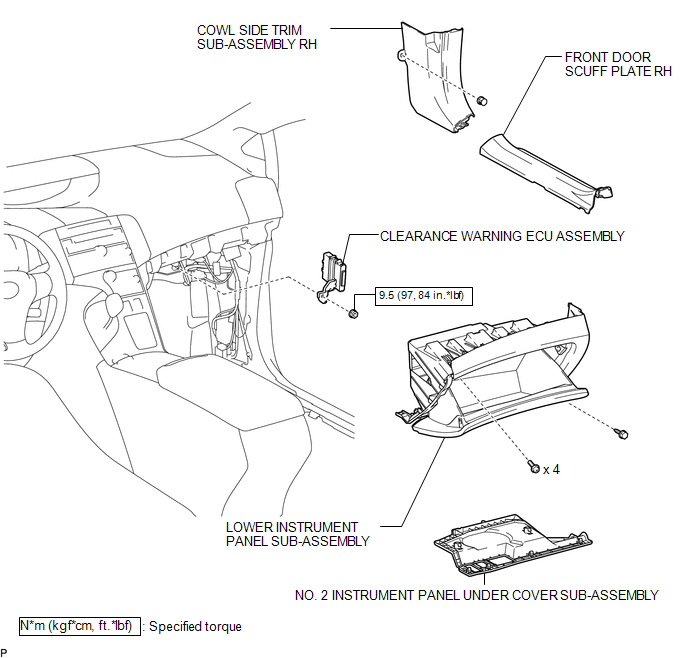
ILLUSTRATION
Removal
REMOVAL
PROCEDURE
1. REMOVE FRONT DOOR SCUFF PLATE RH
.gif)
2. REMOVE COWL SIDE TRIM SUB-ASSEMBLY RH
3. REMOVE NO. 2 INSTRUMENT PANEL UNDER COVER SUB-ASSEMBLY
4. REMOVE LOWER INSTRUMENT PANEL SUB-ASSEMBLY
5. REMOVE CLEARANCE WARNING ECU ASSEMBLY
|
(a) Disconnect the connector. |
|
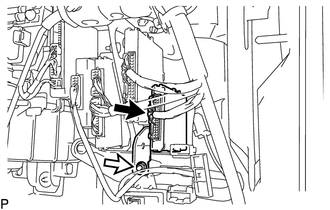
(b) Remove the nut and clearance warning ECU assembly.
Installation
INSTALLATION
PROCEDURE
1. INSTALL CLEARANCE WARNING ECU ASSEMBLY
(a) Install the clearance warning ECU assembly with the nut.
Torque:
9.5 N·m {97 kgf·cm, 84 in·lbf}
(b) Connect the connector.
2. INSTALL LOWER INSTRUMENT PANEL SUB-ASSEMBLY
.gif)
3. INSTALL NO. 2 INSTRUMENT PANEL UNDER COVER SUB-ASSEMBLY
4. INSTALL COWL SIDE TRIM SUB-ASSEMBLY RH
5. INSTALL FRONT DOOR SCUFF PLATE RH
 Clearance Warning Buzzer
Components
COMPONENTS
ILLUSTRATION
Removal
REMOVAL
PROCEDURE
1. REMOVE FRONT DOOR SCUFF PLATE LH
2. REMOVE COWL SIDE TRIM SUB-ASSEMBLY LH
3. REMOVE LOWER NO. 1 INSTRUMENT PANEL FIN ...

Other materials about Toyota Venza:
Disassembly
DISASSEMBLY
PROCEDURE
1. REMOVE MAGNETIC SWITCH ASSEMBLY
(a) Remove the nut and disconnect the lead wire from the magnetic switch.
(b) Remove the 2 screws holding the magnetic switch to t ...
Vehicle Speed Sensor Malfunction (B2283)
DESCRIPTION
The skid control ECU converts wheel speed sensor signals into 4-pulse signals
and sends them to the combination meter. After this signal is converted into a more
precise rectangular waveform by the waveform shaping circuit inside the combinati ...
Steering Lock Position Signal Circuit Malfunction (B2285)
DESCRIPTION
This DTC is stored when serial communication signals and LIN communication signals
in the circuit between the power management control ECU and steering lock actuator
assembly (steering lock ECU) are inconsistent.
DTC No.
...

0.1321