
Toyota Venza: Automatic anti-glare function
Responding to the level of brightness of the headlights of vehicles behind, the reflected light is automatically reduced.
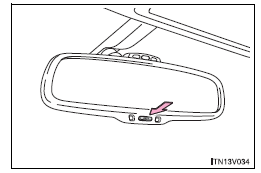
Changing automatic anti-glare function mode ON/OFF
When the automatic anti-glare function is in ON mode, the indicator illuminates.
►Vehicles with smart key system The function will set to ON mode each time the “ENGINE START STOP” switch is turned to IGNITION ON mode.
Pressing the button turns the function to OFF mode. (The indicator also turns off.)
►Vehicles without smart key system The function will set to ON mode each time the engine switch is turned to the “ON” position.
Pressing the button turns the function to OFF mode. (The indicator also turns off.)
- To prevent sensor error
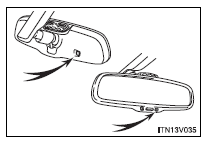
To ensure correct functioning of the sensors, do not touch or cover the sensors.
CAUTION
- While driving
Do not adjust the position of the mirror.
Doing so may lead to mishandling of the vehicle and an accident, or resulting in death or serious injury.
 Adjusting the height of rear view mirror
Adjust the height of the rear view mirror by moving it up and down. ...
 Outside rear view mirrors
Mirror angle can be adjusted using the switch.
Select a mirror to adjust.
1. Left
2. Right
Adjust the mirror.
1. Up
2. Right
3. Down
4. Left ...
Other materials about Toyota Venza:
Installation
INSTALLATION
CAUTION / NOTICE / HINT
HINT:
Use the same procedure for the RH side and LH side.
The procedure listed below is for the LH side.
PROCEDURE
1. INSTALL REAR AXLE CARRIER SUB-ASSEMBLY
(a) Temporarily install the rea ...
Lost Communication with "Door Control Module A" (U0199)
DESCRIPTION
DTC No.
DTC Detection Condition
Trouble Area
U0199
No communication from the outer mirror control ECU (for front passenger
side) continues.
Outer mirror control ...
Lost Communication with Power Source Control (B278C)
DESCRIPTION
This DTC is stored when LIN communication between the certification ECU (smart
key ECU assembly) and power management control ECU stops for more than 10 seconds.
DTC Code
DTC Detection Condition
Trouble Area
...

0.1283