
Toyota Venza: Automatic air conditioning system
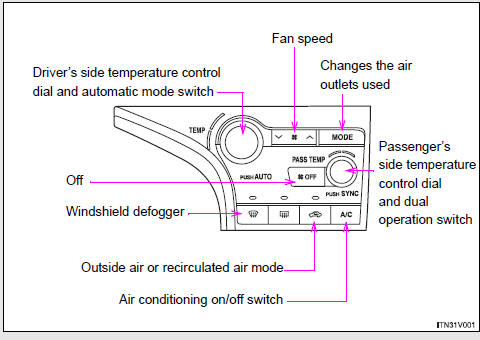
Airflow and outlets are automatically adjusted according to the temperature setting.
► Control panel
► Multi-information display (TFT type)
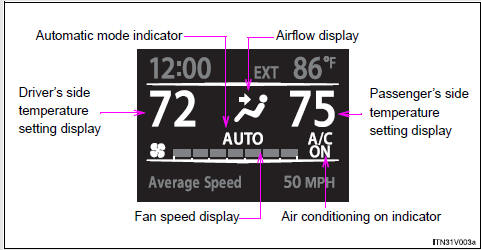
The settings display will differ according to the situation. If
 is pressed while in automatic mode,
the status of all settings will be displayed for a number of seconds.
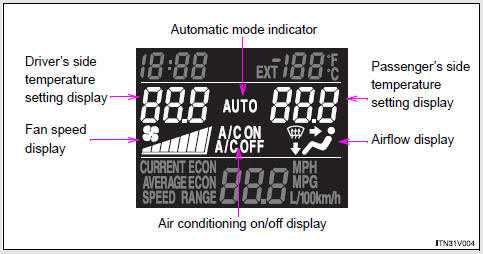
► Multi-information display (LCD type)
- Using the automatic mode
- Adjusting the settings
- Defogging the windshield
- Adjusting the position and opening and closing the air outlets

 Using the automatic mode
Press
.
The air conditioning system will begin to operate. In outside air or recirculated
air mode, air outlets, fan speed and air conditioning on/ off are automatically
adjusted according to ...
Other materials about Toyota Venza:
Replacement
REPLACEMENT
CAUTION / NOTICE / HINT
NOTICE:
Move the shift lever to P and apply the parking brake before bleeding
the brakes.
Add brake fluid to keep the level between the MIN and MAX lines of the
reservoir while bleeding the brakes.
...
Customize Parameters
CUSTOMIZE PARAMETERS
1. CUSTOMIZE METER / GAUGE SYSTEM
(a) Customizing with the Techstream
(1) Connect the Techstream to the DLC3.
(2) Turn the ignition switch to ON.
(3) Turn the Techstream on.
(4) Enter the following menus: Customize Setting / Warning. ...
Skid Control ECU Malfunction (C1300/62)
DESCRIPTION
The skid control ECU outputs this DTC, if malfunctions are found in the circuit
inside the ECU by self diagnosis.
DTC Code
DTC Detection Condition
Trouble Area
C1300/62
Internal failu ...

0.1268