
Toyota Venza: Front Passenger Side Power Window Switch
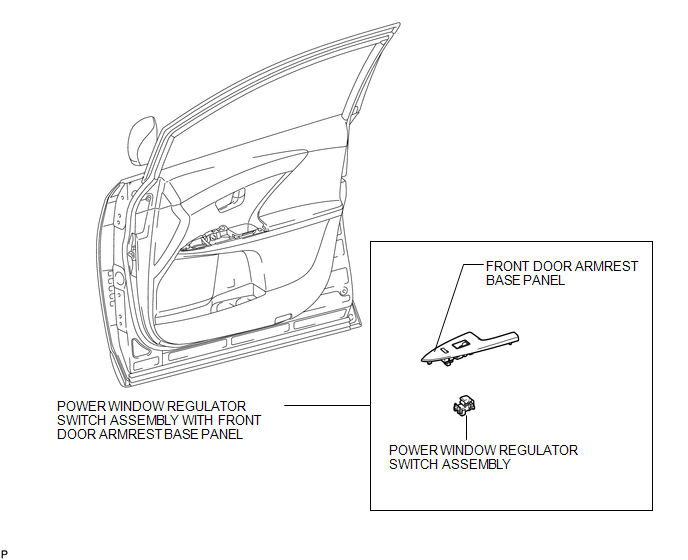
Components
COMPONENTS
ILLUSTRATION
Removal
REMOVAL
PROCEDURE
1. REMOVE POWER WINDOW REGULATOR SWITCH ASSEMBLY WITH FRONT DOOR ARMREST BASE PANEL
|
(a) Using a moulding remover, disengage the 2 clips and 4 claws. |
|
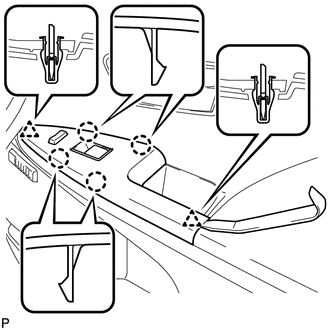
(b) Disconnect the connector and remove the power window regulator switch assembly with front door armrest base panel.
2. REMOVE POWER WINDOW REGULATOR SWITCH ASSEMBLY
|
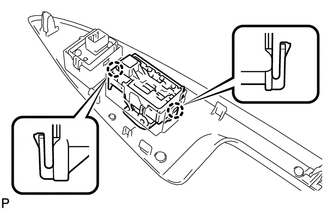
(a) Disengage the 2 claws and remove the power window regulator switch assembly. |
|
Inspection
INSPECTION
PROCEDURE
1. INSPECT POWER WINDOW REGULATOR SWITCH ASSEMBLY
|
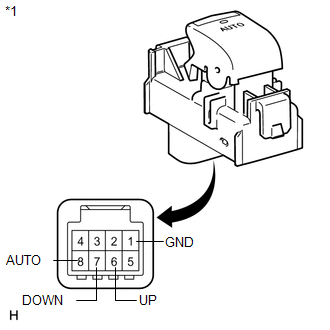
(a) Check the switch function. (1) Measure the resistance according to the value(s) in the table below. Standard Resistance:
If the result is not as specified, replace the power window regulator switch assembly (for front passenger side). |
|
|
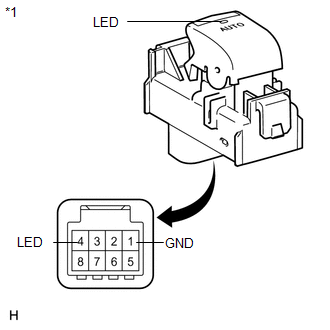
(b) Check that the LED illuminates. (1) Apply battery voltage to the power window regulator switch assembly and check that the LED illuminates. OK:
If the result is not as specified, replace the power window regulator switch assembly (for front passenger side). |
|
Installation
INSTALLATION
PROCEDURE
1. INSTALL POWER WINDOW REGULATOR SWITCH ASSEMBLY
|
(a) Engage the 2 claws to install the power window regulator switch assembly. |
|
.png)
2. INSTALL POWER WINDOW REGULATOR SWITCH ASSEMBLY WITH FRONT DOOR ARMREST BASE PANEL
|
(a) Connect the connector. |
|
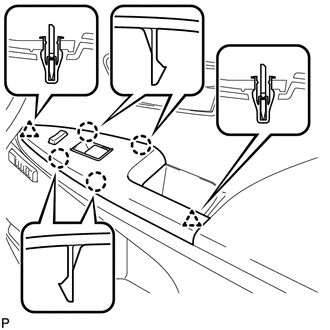
(b) Engage the 2 clips and 4 claws, and install the power window regulator switch assembly with front door armrest base panel.
 Removal
REMOVAL
PROCEDURE
1. REMOVE UPPER BACK WINDOW PANEL TRIM
2. REMOVE BACK DOOR PANEL TRIM ASSEMBLY
3. DISCONNECT POWER BACK DOOR ROD (w/ Power Back Door)
4. REMOVE BACK DOOR TRIM COVER LH ...

Other materials about Toyota Venza:
Inspection
INSPECTION
PROCEDURE
1. INSPECT LUMBAR SUPPORT ADJUSTER ASSEMBLY
(a) Check operation of the lumbar support adjuster.
(1) Check if the lumbar support adjuster moves smoothly when the battery is connected
to the lumbar support adjuster motor connector te ...
Pressure Control Solenoid "G" Electrical (Shift Solenoid Valve SL4) (P2810)
DESCRIPTION
Changing from 1st to 6th is performed by the TCM turning shift solenoid valves
SL1, SL2, SL3, SL4 and SL on and off. If an open or short circuit occurs in any
of the shift solenoid valves, the TCM controls the remaining normal shift solenoid
...
SRS Warning Light Remains ON
DESCRIPTION
The SRS warning light is located on the combination meter assembly.
When the SRS is normal, the SRS warning light comes on for approximately 6 seconds
after the ignition switch is turned from off to ON, and then goes off automatically.
If ther ...

0.1568