
Toyota Venza: When closing the back door
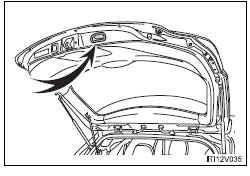
Lower the back door using the back door handle, and make sure to push the back door down from the outside to close it.
Be careful not to pull the back door sideways when closing the back door with the handle.
 Back door
The back door can be opened using the back door opener. The back door can
be locked and unlocked using the entry function (vehicles with smart key system),
wireless remote control or door lock swi ...
 Power back door switch (vehicles with power back door)
Push the switch to close.
Pressing the switch again while the power back door is closing will cause it
to open again.
However, the reverse operation cannot be performed for the first second afte ...
Other materials about Toyota Venza:
Removal
REMOVAL
PROCEDURE
1. DISCONNECT CABLE FROM NEGATIVE BATTERY TERMINAL
NOTICE:
When disconnecting the cable, some systems need to be initialized after the cable
is reconnected (See page ).
2. REMOVE RADIATOR RESERVE TANK ASSEMBLY
(a) Remove t ...
Side Turn Signal Light Assembly
Components
COMPONENTS
ILLUSTRATION
Removal
REMOVAL
CAUTION / NOTICE / HINT
HINT:
Use the same procedure for the RH and LH sides.
The procedure described below is for the LH side.
PROCEDURE
1. REMOVE OUTER MIRROR
2. REMOVE O ...
Back Camera Disconnected (C1622)
DESCRIPTION
This DTC is stored if the navigation receiver assembly*1 or radio and display
receiver assembly*2 judges that the signals or signal lines between the navigation
receiver assembly*1 or radio and display receiver assembly*2, and the rear televis ...

0.1407