
Toyota Venza: Stop the vehicle immediately. Continuing to drive the vehicle may be dangerous.
The following warning indicates a possible problem in the brake system.
Immediately stop the vehicle in a safe place and contact your Toyota dealer.
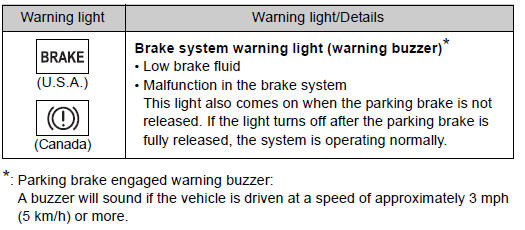
 If a warning light turns on or a warning buzzer sounds...
Calmly perform the following actions if any of the warning lights turn on
or flash. If a light turns on or flashes, but then turns off, this does not necessarily
indicate a malfunction in the syst ...
 Stop the vehicle immediately.
The following warning indicates the possibility of damage to the vehicle that
may lead to an accident. Immediately stop the vehicle in a safe place and contact
your Toyota dealer.
...
Other materials about Toyota Venza:
Diagnostic Trouble Code Chart
DIAGNOSTIC TROUBLE CODE CHART
HINT:
If a trouble code is stored during the DTC check, inspect the trouble areas listed
for that code. For details of the code, refer to the "See page" below.
Main Body
DTC Code
Detection Ite ...
Front Seat Inner Belt Assembly
Components
COMPONENTS
ILLUSTRATION
ILLUSTRATION
Inspection
INSPECTION
PROCEDURE
1. INSPECT FRONT SEAT INNER BELT ASSEMBLY LH (w/ Seat Position Memory System)
(a) Measure the resistance according to the value(s) in the table below.
...
Intake Air Control Valve Actuator(for Tcv)
Components
COMPONENTS
ILLUSTRATION
Removal
REMOVAL
PROCEDURE
1. REMOVE INTAKE MANIFOLD
(a) Remove the intake manifold (See page ).
2. REMOVE INTAKE AIR CONTROL VALVE ACTUATOR (for TCV)
(a) Remove the 2 bolts, intake air control valve actuator a ...

0.1725