
Toyota Venza: Satellite Radio Antenna
Components
COMPONENTS
ILLUSTRATION
.png)
ILLUSTRATION
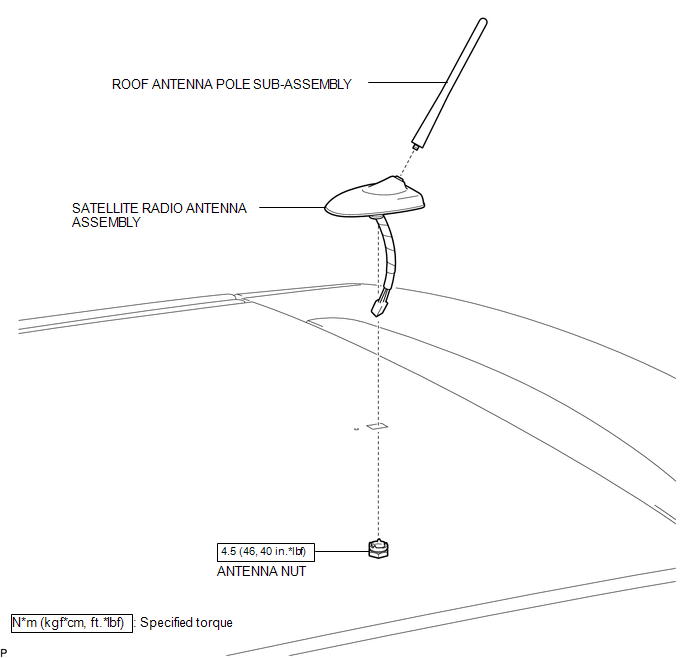
Removal
REMOVAL
PROCEDURE
1. REMOVE ROOF HEADLINING ASSEMBLY
(See page .gif) )
)
2. REMOVE ROOF ANTENNA POLE SUB-ASSEMBLY
3. REMOVE SATELLITE RADIO ANTENNA ASSEMBLY
|
(a) Disconnect the connector. |
|
.png)
|
(b) Remove the antenna nut. |
|
.png)
|
(c) Disengage the 2 claws and remove the satellite radio antenna assembly. |
|
.png)
Installation
INSTALLATION
PROCEDURE
1. INSTALL SATELLITE RADIO ANTENNA ASSEMBLY
(a) Engage the 2 claws to the vehicle body to temporarily install the satellite radio antenna assembly.
|
(b) Place the antenna cord in the cutout of the antenna nut. Text in Illustration
|
|
.png)
(c) Install the satellite radio antenna assembly with the antenna nut.
Torque:
4.5 N·m {46 kgf·cm, 40 in·lbf}
(d) Connect the connector.
2. INSTALL ROOF ANTENNA POLE SUB-ASSEMBLY
.gif)
3. INSTALL ROOF HEADLINING ASSEMBLY
(See page )
 Installation
INSTALLATION
PROCEDURE
1. INSTALL REAR NO. 2 SPEAKER ASSEMBLY (for 13 Speakers)
(a) Install the rear No. 2 speaker assembly with the 2 screws.
...

Other materials about Toyota Venza:
Adjustment
ADJUSTMENT
PROCEDURE
1. ADJUST PARK/NEUTRAL POSITION SWITCH ASSEMBLY
(a) Remove the transmission control shaft lever.
HINT:
See the steps from "Remove Cool Air Intake Duct Seal" through "Remove Park/Neutral
Position Switch Assembly" ...
Dtc Check / Clear
DTC CHECK / CLEAR
1. DTC CHECK USING TECHSTREAM
(a) Connect the Techstream to the DLC3.
(b) Turn the ignition switch to ON.
(c) Turn the Techstream on.
(d) Enter the following menus: Body / Air Conditioner / DTC.
(e) Check for DTCs.
2. DTC CLEAR USING T ...
Sending Malfunction (Navigation to APGS) (U0073,U0100,U0140,U0155)
DESCRIPTION
These DTCs are stored when a malfunction occurs in the CAN communication circuit.
DTC No.
DTC Detection Condition
Trouble Area
U0073
CAN bus connection error
CAN communicatio ...

0.1276