
Toyota Venza: Rear Stabilizer Bar(for 2wd)
Components
COMPONENTS
ILLUSTRATION
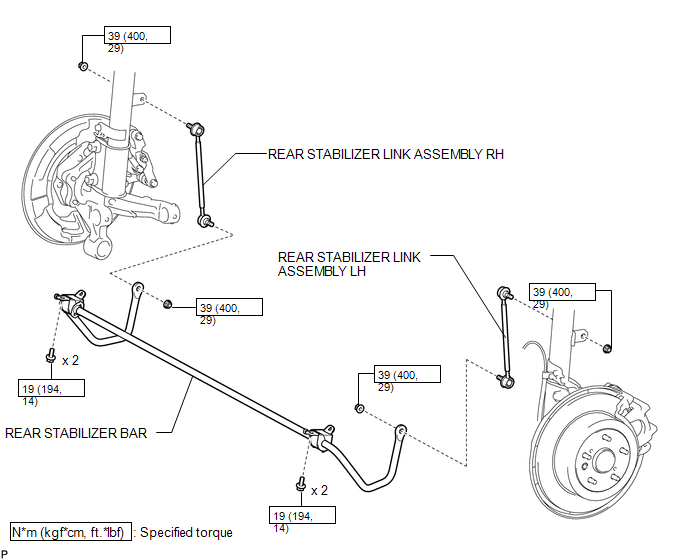
ILLUSTRATION
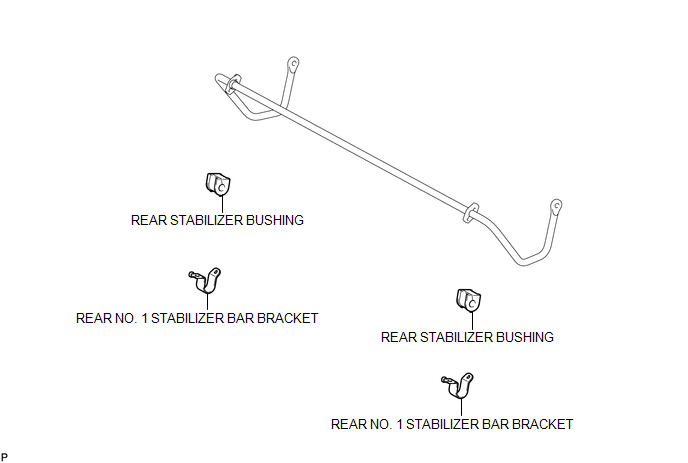
Removal
REMOVAL
PROCEDURE
1. REMOVE REAR WHEELS
2. REMOVE REAR STABILIZER LINK ASSEMBLY LH
|
(a) Remove the nut and separate the rear stabilizer link assembly LH from the rear stabilizer bar. Text in Illustration
HINT: If the ball joint turns together with the nut, use a hexagon wrench (5 mm) to hold the stud bolt. |
|
|
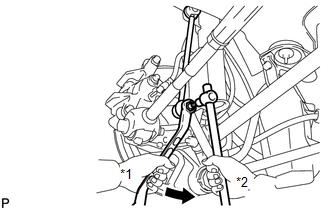
(b) Remove the nut and the rear stabilizer link assembly LH from the rear shock absorber with coil spring LH. Text in Illustration
HINT: If the ball joint turns together with the nut, use a hexagon wrench (5 mm) to hold the stud bolt. |
|
.png)
3. REMOVE REAR STABILIZER LINK ASSEMBLY RH
HINT:
Perform the same procedure as the LH side.
4. REMOVE REAR STABILIZER BAR
|
(a) Remove the 4 bolts and rear stabilizer bar. |
|
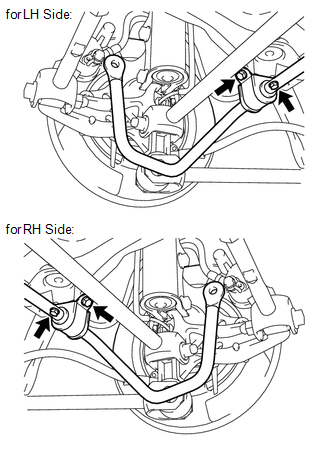
5. REMOVE REAR NO. 1 STABILIZER BAR BRACKET (for LH Side)
|
(a) Remove the rear No. 1 stabilizer bar bracket. |
|
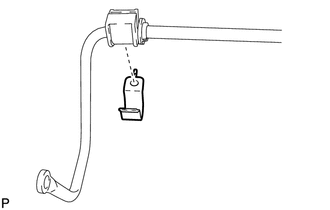
6. REMOVE REAR NO. 1 STABILIZER BAR BRACKET (for RH Side)
HINT:
Perform the same procedure as the LH side.
7. REMOVE REAR STABILIZER BUSHING (for LH Side)
|
(a) Remove the rear stabilizer bushing. |
|
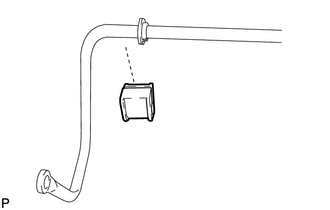
8. REMOVE REAR STABILIZER BUSHING (for RH Side)
HINT:
Perform the same procedure as the LH side.
Inspection
INSPECTION
PROCEDURE
1. INSPECT REAR STABILIZER LINK ASSEMBLY
|
(a) As shown in the illustration, move the ball joint stud back and forth 5 times before installing the nut. |
|
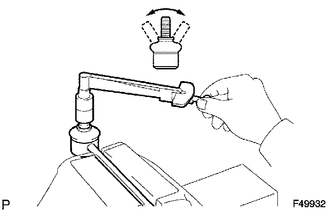
(b) Using a torque wrench, turn the nut continuously at a rate of 3 to 5 seconds per turn and take the torque reading on the fifth turn.
Turning torque:
1.0 N*m (10 kgf*cm, 9 in.*lbf) or less
If the turning torque is not within the specified range, replace the rear stabilizer link assembly with a new one.
(c) Check for any cracks and grease leaks on the ball joint dust cover.
(d) Check that neither unusual drag nor rattle occurs during rotation.
Installation
INSTALLATION
PROCEDURE
1. INSTALL REAR STABILIZER BUSHING (for LH Side)
|
(a) Install the rear stabilizer bushing. NOTICE: Bushing slit should always face vehicle forwards, even if bushing "FRONT" text does not exist. |
|
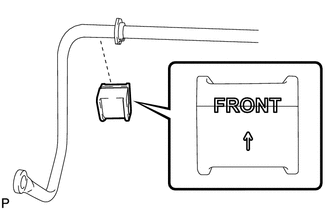
2. INSTALL REAR STABILIZER BUSHING (for RH Side)
HINT:
Perform the same procedure as the LH side.
3. INSTALL REAR NO. 1 STABILIZER BAR BRACKET (for LH Side)
|
(a) Install the rear No. 1 stabilizer bar bracket. |
|
.png)
4. INSTALL REAR NO. 1 STABILIZER BAR BRACKET (for RH Side)
HINT:
Perform the same procedure as the LH side.
5. INSTALL REAR STABILIZER BAR
|
(a) Install the rear stabilizer bar with the 4 bolts in order 1 to 2. Torque: 19 N·m {194 kgf·cm, 14 ft·lbf} |
|
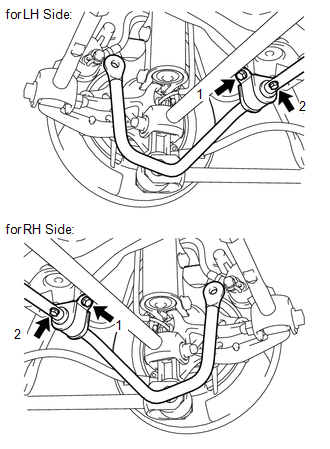
6. INSTALL REAR STABILIZER LINK ASSEMBLY LH
|
(a) Install the rear stabilizer link assembly LH to the rear shock absorber with coil spring LH with the nut. Text in Illustration
Torque: 39 N·m {400 kgf·cm, 29 ft·lbf} HINT: If the ball joint turns together with the nut, use a hexagon wrench (5 mm) to hold the stud bolt. |
|
.png)
|
(b) Install the rear stabilizer link assembly LH to the rear stabilizer bar with the nut. Text in Illustration
Torque: 39 N·m {400 kgf·cm, 29 ft·lbf} HINT: If the ball joint turns together with the nut, use a hexagon wrench (5 mm) to hold the stud bolt. |
|
.png)
7. INSTALL REAR STABILIZER LINK ASSEMBLY RH
HINT:
Perform the same procedure as the LH side.
8. INSTALL REAR WHEELS
Torque:
103 N·m {1050 kgf·cm, 76 ft·lbf}
 Disposal
DISPOSAL
PROCEDURE
1. DISPOSE OF REAR SHOCK ABSORBER
(a) Fully extend the shock absorber piston rod.
(b) Using a drill, make a hole in are ...

Other materials about Toyota Venza:
Torque Converter Clutch Pressure Control Solenoid Control Circuit Electrical
(Shift Solenoid Valve SLU) (P2759)
DESCRIPTION
The amount of current flow to the solenoid is controlled by the duty ratio of
the TCM output signal. The higher the duty ratio becomes, the higher the lock-up
hydraulic pressure becomes during the lock-up operation.
DTC No.
...
Back Door Closer Operation Malfunction (B2250)
DESCRIPTION
The power back door ECU (power back door motor unit)*1 or back door closer ECU
(multiplex network door ECU)*2 receives signals from the latch switch, sector switch
and back door courtesy switch, which are built into the back door lock. Based o ...
Removal
REMOVAL
CAUTION / NOTICE / HINT
HINT:
Use the same procedure for the RH side and LH side.
The procedure listed below is for the LH side.
PROCEDURE
1. DISCONNECT CABLE FROM NEGATIVE BATTERY TERMINAL
CAUTION:
Wait at least 90 seconds aft ...

0.1723