
Toyota Venza: Components
COMPONENTS
ILLUSTRATION
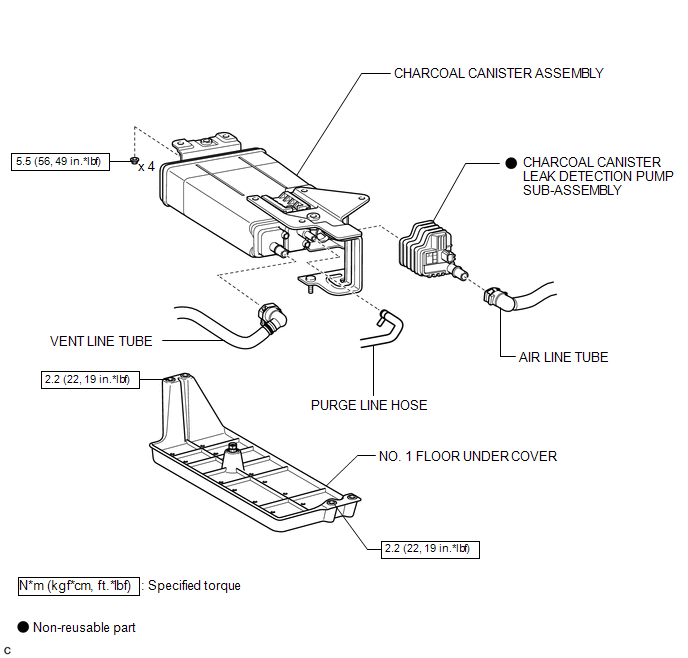
 Canister
...
 Removal
REMOVAL
PROCEDURE
1. REMOVE NO. 1 FLOOR UNDER COVER
(a) Disengage the 4 nuts and clip, and remove the No. 1 floor under cover.
Text in Illustration
Nut (attached to under cov ...
Other materials about Toyota Venza:
Parking brake
Sets the parking brake* (Depressing the pedal again releases the parking brake.)
*: Fully depress the parking brake pedal with your left foot while depressing
the brake pedal with your right foot.
- Usage in winter time
NOTICE
- Before driv ...
Sound of Portable Player cannot be Heard from Speakers or Sound is Low
PROCEDURE
1.
CHECK PORTABLE PLAYER SETTINGS
(a) Check the portable player settings.
(1) Check that the volume is not set to "0".
(2) Check that mute is off.
(b) Check that the sound of the portable player can be h ...
On-vehicle Inspection
ON-VEHICLE INSPECTION
CAUTION / NOTICE / HINT
HINT:
Use the same procedure for the RH side and LH side.
The procedure listed below is for the LH side.
PROCEDURE
1. REMOVE FRONT WHEEL
2. SEPARATE FRONT DISC BRAKE CALIPER ASSEMBLY
3. ...

0.1159