
Toyota Venza: Components
COMPONENTS
ILLUSTRATION
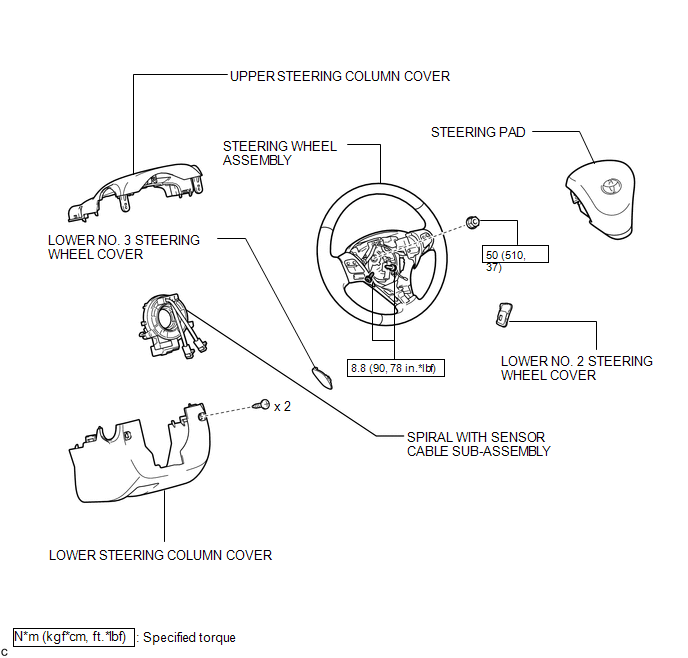

 Installation
INSTALLATION
PROCEDURE
1. INSTALL SPIRAL WITH SENSOR CABLE SUB-ASSEMBLY
(a) Install the spiral with sensor cable sub-assembly (See page
).
NOTICE:
Do not replace the spiral cable with t ...
Other materials about Toyota Venza:
Front Power Seat does not Operate with Front Power Seat Switch
DESCRIPTION
Signals are input into the position control ECU and switch assembly. The built-in
ECU manages the signals received from the position control ECU and switch assembly,
and operates each motor. If the position control ECU and switch assembly rece ...
Pressure Control Solenoid "G" Performance (Shift Solenoid Valve SL4) (P2808)
DESCRIPTION
The TCM uses the vehicle speed signal and signals from the transmission speed
sensors (NC, NT) to detect the actual gear (1st, 2nd, 3rd, 4th, 5th or 6th gear).
Then the TCM compares the actual gear with the shift schedule in the TCM memory
to ...
If you have a flat tire
Remove the flat tire and replace it with the spare provided. - Before
jacking up the vehicle
• Stop the vehicle on a hard, flat surface.
• Set the parking brake.
• Shift the shift lever to “P”.
• Stop the engine.
• Turn on the emergency f ...

0.1526