
Toyota Venza: Clearance Sonar Main Switch
Components
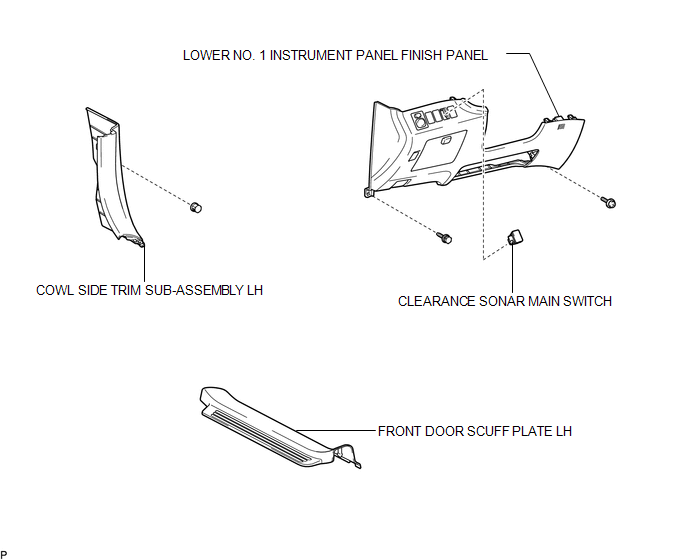
COMPONENTS
ILLUSTRATION
Removal
REMOVAL
PROCEDURE
1. REMOVE FRONT DOOR SCUFF PLATE LH
.gif)
2. REMOVE COWL SIDE TRIM SUB-ASSEMBLY LH
3. REMOVE LOWER NO. 1 INSTRUMENT PANEL FINISH PANEL
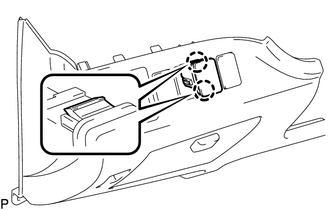
4. REMOVE CLEARANCE SONAR MAIN SWITCH
|
(a) Disengage the 2 claws and remove the clearance sonar main switch. |
|
Inspection
INSPECTION
PROCEDURE
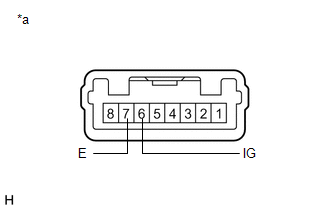
1. INSPECT BACK SONAR OR CLEARANCE SONAR SWITCH ASSEMBLY
|
(a) Measure the resistance according to the value(s) in the table below. Standard Resistance:
If the result is not as specified, replace the back sonar or clearance sonar switch assembly. |
|
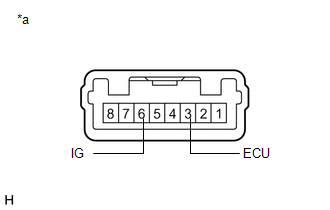
(b) Check that the switch illuminates.
|
(1) Apply battery voltage to the back sonar or clearance sonar switch assembly and check that the switch illuminates. OK:
If the result is not as specified, replace the back sonar or clearance sonar switch assembly. |
|
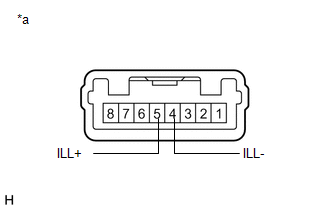
(c) Check switch indicator operation.
|
(1) Apply battery voltage to the back sonar or clearance sonar switch assembly and check that the switch indicator illuminates. OK:
If the result is not as specified, replace the back sonar or clearance sonar switch assembly. |
|
Installation
INSTALLATION
PROCEDURE
1. INSTALL CLEARANCE SONAR MAIN SWITCH
(a) Engage the 2 claws to install the clearance sonar main switch.
2. INSTALL LOWER NO. 1 INSTRUMENT PANEL FINISH PANEL
.gif)
3. INSTALL COWL SIDE TRIM SUB-ASSEMBLY LH
4. INSTALL FRONT DOOR SCUFF PLATE LH

 Clearance Warning Buzzer
Components
COMPONENTS
ILLUSTRATION
Removal
REMOVAL
PROCEDURE
1. REMOVE FRONT DOOR SCUFF PLATE LH
2. REMOVE COWL SIDE TRIM SUB-ASSEMBLY LH
3. REMOVE LOWER NO. 1 INSTRUMENT PANEL FIN ...
Other materials about Toyota Venza:
Terminals Of Ecm
TERMINALS OF ECM
HINT:
The standard voltage between each pair of ECM terminals is shown in the table
below. The appropriate conditions for checking each pair of terminals are also indicated.
The result of checks should be compared with the standard vol ...
Brake Switch "B" Circuit High (P0724)
DESCRIPTION
The purpose of this circuit is to prevent the engine from stalling when brakes
are suddenly applied while driving in lock-up condition.
When the brake pedal is depressed, the stop light switch sends a signal to the
ECM. Then the ECM cancels t ...
Removal
REMOVAL
PROCEDURE
1. REMOVE WINDSHIELD WIPER MOTOR AND LINK
(a) Remove the windshield wiper motor and link (See page
).
2. REMOVE OUTER COWL TOP PANEL SUB-ASSEMBLY
3. REMOVE COOL AIR INTAKE DUCT SEAL
4. REMOVE NO. 1 ENGINE COVER SUB-ASSEMBLY
...

0.157